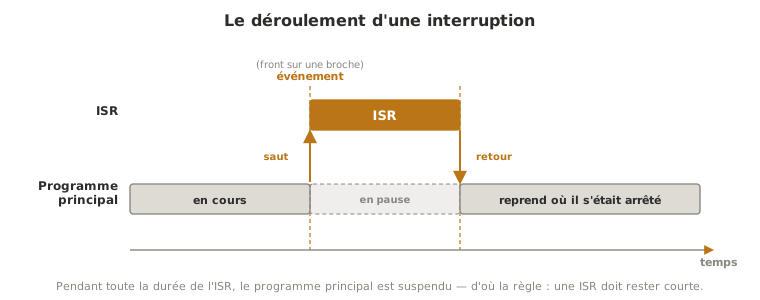
An interrupt is a mechanism by which a microcontroller suspends the running program the moment an event occurs, runs a small dedicated function, the interrupt service routine (ISR), then picks the program up exactly where it left off. It is the way to react at once to an event without having to watch for it in a loop, and to never miss a signal too brief to be caught in passing.
What is it for?
Without interrupts, a program only notices an event by going and checking for it itself, over and over, in its main loop: that is polling. As long as the loop stays short, that is enough. But two situations defeat it:
- the event is too brief: a pulse a few microseconds long (a magnet passing a sensor, an encoder tick) can appear and vanish between two passes of the loop, which will never see it;
- the loop is busy: if it is taking its time over something else (displaying, computing, waiting), it reacts late to an urgent event — an emergency stop pressed during that dead time is only taken into account much later.
The interrupt turns the logic around: it is no longer the program that goes looking for the event, it is the event that comes looking for the program. The hardware watches continuously, and fires the ISR at the precise instant the event happens. Three benefits follow: you miss nothing, you react without delay, and the main loop stays free to do its own work between two events. It is also the mechanism that wakes a sleeping microcontroller (see deep sleep).
How does it work?
An interrupt brings four elements together.
- The triggering event. A hardware condition watched continuously: an edge on a pin, a Timer counter overflowing, a byte received on a serial link, an analog conversion finishing. It is what causes the interrupt.
- The interrupt vector. An internal table maps each interrupt source to the address of the matching ISR. When the event occurs, the microcontroller consults that table and jumps to the right routine — automatically, without the program having to ask.
- The interrupt service routine (ISR). The function that runs. It has to stay very short: while it runs, the main program is frozen and, most of the time, the other interrupts are blocked. Its golden rule is to do the strict minimum — increment a counter, store a value, raise a flag — and to leave the processing to the main program.
- The return. On leaving the ISR, the microcontroller restores the state of the program and resumes where it was. The interrupt has to be transparent: the main code does not even “know” it was suspended.
Two technical notions come with this mechanism, and they are the source of the most frequent bugs.
The volatile keyword. A variable shared between the ISR and the main program has to be declared volatile. Without it, the compiler, believing the variable unchanged, may keep a stale copy and never see the update the ISR made. volatile forces a fresh read from memory on every access.
Atomic reads. On an 8-bit microcontroller, reading a 16- or 32-bit variable takes several memory accesses. If an interrupt lands in the middle of that read and changes the variable, the main program gets a value that is half old, half new, and inconsistent. The remedy is to read the variable inside a critical section, disabling interrupts briefly for the time of the copy, then re-enabling them.
On the Arduino side, this mechanism is handled with attachInterrupt() and the volatile keyword. Putting it to work is covered in the Arduino interrupts tutorial, and for MicroPython in Setting up an external interrupt in MicroPython.
Interrupt sources
An interrupt does not only come from a pin: most peripherals of a microcontroller can raise one. The mechanism stays the same (vector → ISR → return). Only the way you arm it changes.
| Source | Trigger | Typical use | In practice |
|---|---|---|---|
| External / pin | rising or falling edge on a pin | urgent button, pulse counter, encoder | Arduino · MicroPython |
| Timer | a hardware counter overflowing | regular pacing (sampling, refreshing) | Arduino · MicroPython |
| Serial link | byte received on the UART | receiving without watching the port | usually handled by the library |
| End of ADC conversion | analog measurement finished | fast continuous acquisition | advanced mode, rare in a student project |
| Watchdog | monitoring deadline passed | detecting a stuck program | mode not exposed on every family |
The two sources most used in a project — external (reacting to a physical event) and timer (imposing a rate) — each have their own application page. The others turn up mainly in advanced setups, or are already handled without anyone having to care, as with the serial link.
Example — The emergency stop button
A system runs a loop that takes, say, a tenth of a second to go round (computing, display, communication). An operator presses the emergency stop button.
With polling, the button is read once per loop iteration. In the worst case, the press happens just after the read: you have to wait for the end of the iteration for it to be taken into account. A tenth of a second of delay on an emergency stop is unacceptable. Worse, if the press is brief and the loop is long, it can slip between two reads and never be seen at all.
With an interrupt, the button is wired to an interrupt pin. At the instant of the press, the running program is suspended and the ISR executes: it cuts the power output and raises a flag. The reaction is immediate and guaranteed, whatever the loop happened to be doing. The ISR does no more than cut and signal. The main program then handles displaying the fault and the restart procedure: long processing has no place in an ISR.
This case sums up the rule for choosing: as soon as an event is urgent or fleeting, it calls for an interrupt. For everything else, polling is enough and stays simpler.
Pitfalls
An ISR that runs too long. During the ISR, the main program is frozen and the other interrupts are often blocked. An ISR that computes, waits or displays destabilises the whole system. It has to do the minimum and hand back quickly.
Forgetting volatile. A variable shared between the ISR and the main loop without volatile can be read stale: the program never sees the update. Any variable touched by an ISR and read elsewhere is volatile.
A non-atomic read. Reading a multi-byte variable shared with an ISR without protection can return an inconsistent value if the interrupt lands in the middle. Copy it inside a critical section, with interrupts disabled for the time of the read.
Calling delay() or writing to the serial port inside the ISR. These functions rest on interrupts themselves, and those are disabled during the ISR: they misbehave or block. You do no timing and no display in there.
Believing that time moves on inside the ISR. The hardware counter does keep running. But the software clock (millis() and the like) rests on an interrupt itself, blocked during the ISR: it stops advancing. Measuring or waiting out a duration from inside an ISR gives false results.
Forgetting button bounce. A mechanical press bounces for a few milliseconds: an interrupt pin wired to a button fires several ISRs per press. Filter it — ignore triggers too close together, or raise a flag in the ISR and handle the debouncing in the main program.
Putting an interrupt everywhere. An interrupt adds complexity and traps of its own (concurrency, volatile, atomicity). For a slow, non-urgent event, polling is simpler and safer. The interrupt is kept for brief or critical events.
Special case — Waking from sleep
When a microcontroller is put to sleep to save energy (see deep sleep), its main program stops running: only a hardware event can wake it. That wake-up is an interrupt — typically a pin changing state, or a timer coming due. This is what lets a battery-powered object sleep for hours drawing almost nothing, then wake instantly at the slightest event. Configuring the wake-up source is therefore configuring an interrupt.
See also
- Microcontroller — the chip that carries the interrupt mechanism
- Interrupts on Arduino — putting external interrupts to work (
attachInterrupt, code and wiring) - Interrupts in MicroPython — the same mechanics for MicroPython
- Arduino timers — periodic interrupts for pacing a task
- Timers in MicroPython — the same periodic interrupts for MicroPython
- Watchdog — deadline monitoring, which can raise an interrupt too
- GPIO — the input pins, source of external interrupts
- Deep sleep — sleep mode, whose wake-up an interrupt provides
- Non-blocking programming — the cooperative loop, and what it cannot catch fast enough