Using a hardware timer in MicroPython means setting up a counter so that an action runs at a precise interval, through the machine.Timer class. The timer fires an interrupt at the chosen frequency: a perfectly steady rate that a ticks_ms() loop cannot guarantee. Where Arduino requires a library (TimerOne) or direct register work, MicroPython exposes a uniform API that holds from one board to the next.
What is it for?
To pace a task, the reflex is [[micropython-temporisation-en|ticks_ms()]] inside the loop. That is enough for a blink, but the rate drifts as soon as the loop does work of varying length. For sampling, filtering or control, that wobble corrupts the maths. A hardware timer settles the question: it fires the action on an interrupt, at exactly the right frequency, whatever the loop happens to be doing. It frees the loop from its role as a stopwatch. You put one in place as soon as a function needs a time base it can trust. For loose timing, ticks_ms() stays simpler: the hardware timer is for what has to be precise and regular.
Step by step
Three steps: create the timer with its period or frequency and its callback, keep the callback minimal, do the work in the loop.
1. Create the timer
Timer.init() sets the frequency (or the period) and the mode, and attaches the callback called on every due date:
from machine import Timer

def on_timer(timer):              # callback : recoit le timer, reste minimal
    global echeance
    echeance = True

echeance = False
tim = Timer()                              # timer virtuel (rp2)
tim.init(freq=100, mode=Timer.PERIODIC, callback=on_timer)   # 100 Hz
Take your pick: freq=100 (Hz) or period=10 (ms). Mode: Timer.PERIODIC (repeating) or Timer.ONE_SHOT (once). tim.deinit() stops the timer.
On the Pico (RP2), machine.Timer is a virtual timer (only id=-1, hence the call to Timer() with no number): there is no dedicated timer peripheral to choose, as there would be on an AVR. Its time base is the RP2040’s hardware system timer (microsecond resolution), which generates the interrupts. Hence the regularity: it is that hardware base which “keeps the clock”, not a counter you would set up by hand.
2. Keep the callback minimal
The callback runs as an interrupt service routine: it obeys the rules of interrupts — short, and ideally with no memory allocation (no formatted print, no object created; see interrupts). That allocation rule applies in full with hard=True (the callback becomes a hard IRQ, with minimal jitter). By default, it is a soft IRQ where allocation goes through, but harms regularity. Either way, the same reflex: it does nothing but raise a flag (a global that already exists).
3. Do the work in the loop
The loop sees the flag raised and does the heavy work (reading, computing, displaying), which is where print and allocation are allowed:
while True:
    if echeance:
        echeance = False
        # ... travail cadence ...
Take a screenshot of Thonny’s plotter (Traceur) showing samples evenly spaced in time.
Example — Sampling a sensor at 100 Hz
We read an analogue input exactly one hundred times per second, to feed a filter or a control loop running at constant step. The timer sets the pace, the callback raises a flag, the loop reads and sends.
from machine import Timer, ADC, Pin

capteur = ADC(Pin(26))
echeance = False

def on_timer(timer):              # callback : juste lever le drapeau
    global echeance
    echeance = True

tim = Timer()
tim.init(freq=100, mode=Timer.PERIODIC, callback=on_timer)   # 100 Hz

while True:
    if echeance:                  # tombe a cadence reguliere
        echeance = False
        print(capteur.read_u16()) # lecture + print dans la boucle, pas dans le callback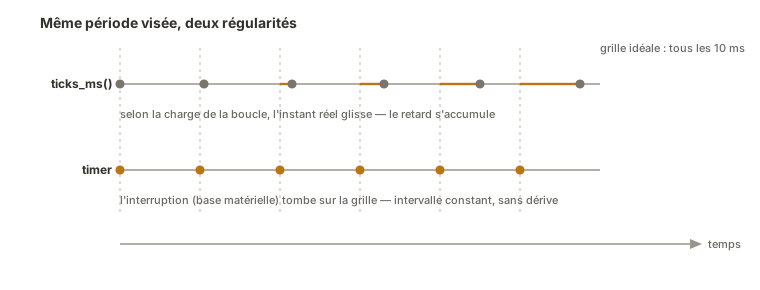
Sampling happens every 10 ms whatever the load on the loop, because it is the hardware that keeps the clock. The callback does nothing but signal. All the logic stays in the loop. Compared with a ticks_ms() rate, the regularity comes with no drift, which changes everything for signal processing.
Pitfalls
Allocating inside a hard=True callback. In a hard IRQ, a formatted print, creating an object or a floating-point computation that allocates are forbidden. In a soft IRQ (the default), allocation goes through but harms regularity. Either way, the callback does nothing but raise a flag and the loop does the work. See the allocation rule for interrupts.
Forgetting global. Without global echeance, the callback creates a local variable and the loop’s flag never goes up.
A callback longer than the period. Pacing at 10 kHz a callback that takes more than 100 µs to run leaves no time at all for the loop, and the timer gets caught by the next one. Check that the period matches what you are asking it to do.
A period too short for the actual work. The same logic on the loop side: if the work triggered by the flag overruns the period, the system falls apart. Measure it.
Believing a ticks_ms() rate is worth a timer rate. For anything precise it is not: only the hardware base guarantees regularity. That is the criterion for choosing between [[micropython-temporisation-en|ticks_ms()]] and a timer.
Not keeping a reference to the timer. If the Timer object is released (a local variable going out of scope), the garbage collector may stop it. Keep it in a variable that lives as long as you need it.
Special case — ONE_SHOT and several timers
Timer.ONE_SHOTfires the callback once only after the delay — handy for a deferred timeout (switching an LED off after N ms without blocking the loop).- You can create several independent timers (different rates), each with its own callback. Keep every callback minimal so they do not get in each other’s way.
Where it fits in the project
- Step 2 of the proof-of-concept phase — sampling or pacing a function at constant step on an isolated bench, a prerequisite for any clean measurement or control loop.
- Step 3 of the integration and testing phase — the system’s command loop (a PID control loop) runs at a fixed period imposed by a timer, which is the condition of its stability.
Having a hardware time base you can trust is what separates a rig that “roughly works” from a system whose behaviour in time is under control, and it becomes indispensable the moment you close a loop.
See also
- Timer — the parent concept: counter, prescaler, overflow, compare match (worth understanding before writing code)
- MicroPython — hub for the module
- Interrupts — the mechanism through which the timer runs its callback (and the allocation rule)
- sleep() vs ticks_ms() — software timing, the imprecise alternative
- PID control — a direct use of constant-step sampling
- Hardware timer (Arduino) — the C++ equivalent (TimerOne, CTC registers)