Non-blocking programming is a way of structuring an embedded program so that the main loop never stops. Instead of waiting with sleep(), each task moves forward a little on every pass through the loop and then hands back control: the system carries on several activities at once and stays responsive. It is not a function to call but a discipline of architecture, resting on [[micropython-temporisation-en|timing with ticks_ms()]] and on state machines. MicroPython adds a dedicated tool of its own, asyncio, which puts that cooperation on a formal footing.
What is it for?
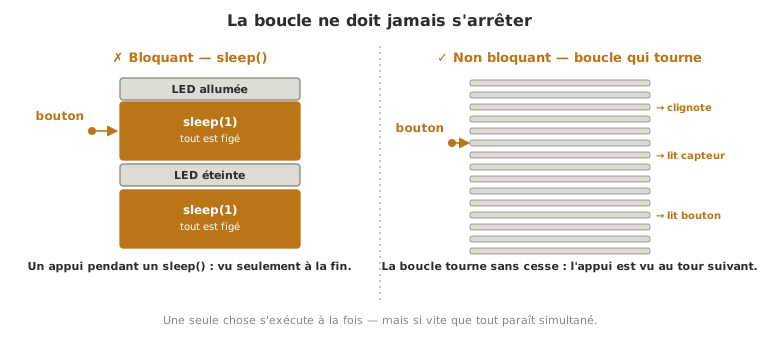
sleep() freezes the whole program, not just the task that is waiting: during a sleep(0.5), the Pico stops reading its button and misses its measurements. As long as a script only does one thing, nobody notices. The moment it does two, it hits the wall.
The rule that follows fits in one sentence: no function may block, and the loop must always be able to come round again. Why that discipline holds for every embedded program, what it buys you and where it stops: see the cross-cutting concept page on non-blocking programming. Here, we put it to work in MicroPython — from the proof of concept onwards, at the first rig that combines several functions.
Step by step
Four steps: set the rule, make each task self-contained, assemble them in the loop, learn to refactor blocking code.
1. Banish sleep(), think in tasks
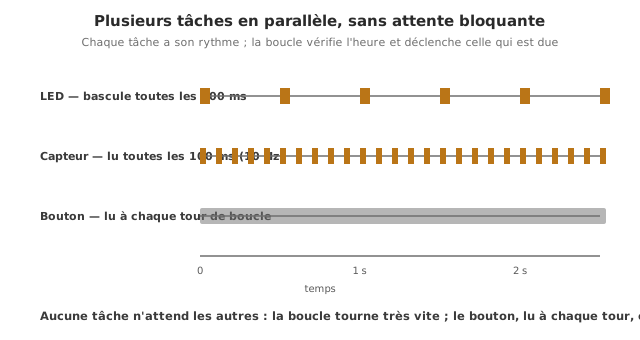
The mental switch: what the system “does” is broken down into tasks, and each task becomes a function called on every pass, which acts if the moment has come and hands back control immediately. No function waits any more.
2. Give each task its own time and state
A self-contained task carries what it needs: time — its own date of last passage, compared through the pattern ticks_diff(ticks_ms(), dernier) >= intervalle (see timing); a state — if it has modes, it is a small state machine with a variable of its own.
3. Assemble the tasks in the loop
The loop does nothing but call each task on every pass (the cooperative loop, or super-loop):
while True:
    tache_led()        # chacune agit si c'est son moment,
    tache_capteur()    # puis rend la main aussitot
    tache_bouton()
The order matters little as long as each task stays brief: the loop runs very fast, so all of them are served practically at the same time.
4. Refactoring blocking code
The blocking blinker:
while True:
    led.on();  sleep(0.5)      # <- pause : tout est fige
    led.off(); sleep(0.5)
becomes a task that remembers the time instead of waiting:
from time import ticks_ms, ticks_diff

t_led = ticks_ms()
etat_led = 0

def tache_led():
    global t_led, etat_led
    if ticks_diff(ticks_ms(), t_led) >= 500:    # a-t-on attendu assez ?
        t_led = ticks_ms()
        etat_led ^= 1
        led.value(etat_led)
The refactoring rule: every sleep() hides a “wait until such a time has elapsed”. We rewrite it as a test on ticks_diff, and every “wait until an event arrives” becomes a test on a condition, on every pass.
Example — A station doing three things at once
Blinking an LED (1 Hz), reading a sensor (10 Hz) and reacting without delay to a button. Three cooperative tasks, none of which blocks.
from machine import Pin, ADC
from time import ticks_ms, ticks_diff

led = Pin(15, Pin.OUT)
capteur = ADC(Pin(26))
bouton = Pin(14, Pin.IN, Pin.PULL_UP)

t_led = ticks_ms(); etat_led = 0
t_cap = ticks_ms()
dernier_btn = 1

def tache_led():
    global t_led, etat_led
    if ticks_diff(ticks_ms(), t_led) >= 500:
        t_led = ticks_ms(); etat_led ^= 1; led.value(etat_led)

def tache_capteur():
    global t_cap
    if ticks_diff(ticks_ms(), t_cap) >= 100:
        t_cap = ticks_ms(); print(capteur.read_u16())

def tache_bouton():
    global dernier_btn
    lect = bouton.value()
    if dernier_btn == 1 and lect == 0:        # front descendant
        print("press!")
    dernier_btn = lect

while True:
    tache_led()
    tache_capteur()
    tache_bouton()
The loop reviews its three tasks on every pass: the LED blinks, the sensor is read ten times a second, the button is seen the moment it is pressed, because nothing ever stops the loop. Adding a fourth activity means writing a fourth task. The same thing with sleep() would be unworkable.
Special case — asyncio, MicroPython’s built-in tool
Where Arduino has nothing but the millis() pattern written by hand, MicroPython ships asyncio: you write each task as a coroutine (async def) that hands back control with await asyncio.sleep_ms(...), and the scheduler takes care of interleaving them. The code becomes linear again (you “wait” inside each task) without blocking the others.
import asyncio                 # 'uasyncio' sur les firmwares plus anciens
from machine import Pin

led = Pin(15, Pin.OUT)

async def clignoter():
    while True:
        led.toggle()
        await asyncio.sleep_ms(500)     # rend la main pendant l'attente

async def lire_capteur():
    while True:
        print("reading")
        await asyncio.sleep_ms(100)

async def main():
    asyncio.create_task(clignoter())
    asyncio.create_task(lire_capteur())
    while True:
        await asyncio.sleep_ms(1000)

asyncio.run(main())
asyncio is the idiomatic form of cooperation in MicroPython as soon as the tasks start to multiply. The await is the moment a task hands back control: a blocking sleep() in the middle of a coroutine would wreck everything, just as it would in the super-loop.
Special case — The limit: an RTOS and the second core
Cooperation rests on the goodwill of every task: if one of them lingers, it holds up the others. When some of them have to meet strict deadlines, you reach the limit. Two ways onwards: an RTOS (FreeRTOS, which preempts — see Multitasking with FreeRTOS and firmware); or, on the dual-core RP2040/RP2350, running a task on the second core (import _thread) for genuine hardware parallelism.
Pitfalls
A sleep() hiding inside a task. A single forgotten sleep() freezes the whole program. The rule holds for every function in the loop (and every asyncio coroutine).
A task that runs too long. Even with no sleep(), a task that computes for a long time or waits actively blocks the others. Every task must be brief and, if need be, broken down into states.
Believing this is genuine parallelism. On a single core, one task runs at a time, very fast, in sequence. Only interrupts (and the second core) really do run “on top of” the loop.
Badly handled time variables. Always compare with ticks_diff(), never by direct subtraction (the counter overflows — see timing).
Waiting for an answer by blocking. Watching for a frame by active waiting freezes the loop. Turn the wait into a test on every pass: “has the answer arrived? If not, I will come back later”.
Forgetting global inside a task. A function that updates its date or state has to declare those variables global (or wrap them in a class or object), otherwise Python creates a local variable and the state is lost from one pass to the next.
Where it fits in the project
- Step 3 of the proof-of-concept phase — as soon as the rig does more than one thing (measuring and commanding and signalling), structure it into non-blocking tasks rather than discovering the blockage at integration.
- Integration and testing phase — the firmware of the complete system is a set of cooperative tasks (or
asyncio, or an RTOS): every function validated on its own becomes a task in it.
Adopting the non-blocking discipline at the first multi-function rig saves the complete rewrite that awaits any program built on sleep().
See also
- sleep() vs ticks_ms() — the building block of every task
- State machine — every task with modes is a small state machine
- Programming a state machine in MicroPython — this concept implemented in the MicroPython path
- MicroPython — hub for the module
- Interrupts — for events the loop cannot catch quickly enough
- Hardware timers — for imposing a precise rate on a critical task
- Non-blocking programming — the cross-cutting concept: the timing pattern, its twins from one family to the next, and the RTOS boundary
- Firmware — the architecture of embedded code and the RTOS horizon (cross-cutting)
- Non-blocking programming (Arduino) — the C++ equivalent (
millis())