Timing is the art of measuring or producing a delay. MicroPython offers two tools that are opposites in philosophy: sleep() (and its variants), which suspends the whole program for a given length of time, and ticks_ms(), which gives the time elapsed since start-up. Moving from one to the other — going from sleep() to the patterns built on ticks_ms() — is the most structuring step between a beginner’s script and an embedded program worthy of the name. It all comes from the [[micropython-modules-en|time]] module.
What is it for?
Every serious program needs time: blinking at 1 Hz, sampling at 10 Hz, raising an alarm after 3 s, running a control loop every 20 ms. With no handling of time, you end up either with a program that has no rhythm, or with one blocked by sleep() that misses everything while it pauses. This page shows both tools, and argues why ticks_ms() ends up winning.
Step by step
Four steps: sleep() to get going, understanding its limit, switching to ticks_ms(), handling several timings.
1. sleep() — the teaching time bomb
from machine import Pin
from time import sleep

led = Pin("LED", Pin.OUT)
while True:
    led.on()
    sleep(0.5)       # secondes (accepte un flottant)
    led.off()
    sleep(0.5)
sleep(N) pauses the program for N seconds. Integer variants: sleep_ms(N) (milliseconds), sleep_us(N) (microseconds — handy for a short pulse, see the HC-SR04). Simple and readable, but nothing else runs during the pause — no button reading, no sensor measurement.
2. Understanding the limit
while True:
    led.on()
    sleep(1)
    led.off()
    sleep(1)
    # Pendant ces 2 s : impossible de lire un bouton, un capteur, ou la liaison serie
If a button is meant to interrupt the blinking, this code will only see it up to 2 s late. Unacceptable as soon as you have two things to do at once.
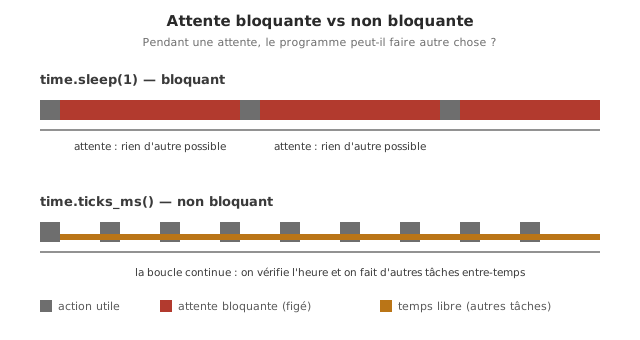
3. ticks_ms() — the non-blocking clock
ticks_ms() returns a count of milliseconds since start-up. The program does not stop. It consults the clock. A crucial difference from Arduino: you do not subtract ticks_ms() values directly (the counter overflows and starts again). You use ticks_diff(now, start), which is designed to handle that overflow.
from machine import Pin
from time import ticks_ms, ticks_diff

led = Pin("LED", Pin.OUT)
dernier = ticks_ms()
INTERVALLE = 500      # ms
etat = False

while True:
    if ticks_diff(ticks_ms(), dernier) >= INTERVALLE:
        dernier = ticks_ms()
        etat = not etat
        led.value(etat)

    # Ici on peut faire AUTRE CHOSE sans bloquer
    # (lire un bouton, mesurer un capteur...)
On every pass, we check whether the interval has elapsed: if it has, we act, if not, we carry on. The pattern if ticks_diff(ticks_ms(), dernier) >= intervalle: is the incantation to commit to memory.
4. Several timings in parallel
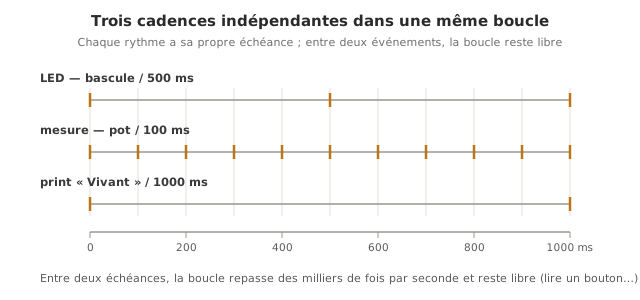
The decisive advantage: several independent rates inside the same loop.
from machine import Pin, ADC
from time import ticks_ms, ticks_diff

led = Pin("LED", Pin.OUT)
pot = ADC(Pin(26))

t_led = t_mesure = t_print = ticks_ms()
INT_LED, INT_MESURE, INT_PRINT = 500, 100, 1000   # ms

while True:
    maintenant = ticks_ms()

    if ticks_diff(maintenant, t_led) >= INT_LED:
        t_led = maintenant
        led.toggle()

    if ticks_diff(maintenant, t_mesure) >= INT_MESURE:
        t_mesure = maintenant
        val = pot.read_u16()        # ... traiter la mesure

    if ticks_diff(maintenant, t_print) >= INT_PRINT:
        t_print = maintenant
        print("Alive")
Three rates (LED at 1 Hz, measurement at 10 Hz, printing at 1 Hz) live side by side with no sleep() at all. The loop stays free to listen for a button.
Example — Non-blocking blink plus a responsive button
An LED blinks at 1 Hz and a button switches the frequency between 1 Hz and 5 Hz with no loss of responsiveness — impossible with a single sleep().
from machine import Pin
from time import ticks_ms, ticks_diff

led = Pin(15, Pin.OUT)
bouton = Pin(14, Pin.IN, Pin.PULL_UP)

# Clignotement : ce sont des VARIABLES, elles changent en cours d'execution
t_led = ticks_ms()        # date du dernier basculement de la LED
intervalle = 500          # demi-periode courante : 500 ms = 1 Hz, 100 ms = 5 Hz
etat = False              # LED actuellement allumee (True) ou eteinte (False)

# Bouton : anti-rebond + detection de front
dernier_btn = 1           # derniere lecture BRUTE (1 = relache, pull-up)
etat_stable = 1           # etat CONFIRME une fois le rebond passe
dernier_chg = ticks_ms()  # date de la derniere transition de la lecture brute
DELAI_REBOND = 30         # ms de stabilite exigee avant de valider

while True:
    maintenant = ticks_ms()                # on lit l'horloge UNE fois par tour

    # 1. Clignotement a la cadence courante, sans sleep()
    if ticks_diff(maintenant, t_led) >= intervalle:
        t_led = maintenant                 # memoriser l'instant du basculement
        etat = not etat                    # inverser l'etat
        led.value(etat)

    # 2. Bouton : filtrer le rebond, agir au FRONT (une fois par appui)
    lecture = bouton.value()
    if lecture != dernier_btn:             # la lecture brute vient de changer
        dernier_chg = maintenant           # (re)demarrer le chrono d'anti-rebond
        dernier_btn = lecture
    if ticks_diff(maintenant, dernier_chg) > DELAI_REBOND and lecture != etat_stable:
        etat_stable = lecture              # valider ce nouvel etat stable
        if etat_stable == 0:                       # front descendant = bouton appuye
            intervalle = 100 if intervalle == 500 else 500   # bascule 1 Hz <-> 5 Hz
How to read this code. The program runs two independent mechanisms inside the same loop, without either one blocking the other.
- The blinking rests on
ticks_ms():t_ledholds the date of the last toggle, andticks_diff(maintenant, t_led) >= intervalleasks on every pass “has enough time gone by?“. If it has, we toggle the LED again and sett_ledback tomaintenant. Changingintervalle(500 ↔ 100 ms) is all it takes to change the rate. - The button combines debouncing and edge detection, exactly as in reading a digital input:
dernier_btnfollows the raw reading,etat_stablethe confirmed state once the bounce has passed (DELAI_REBOND). The conditionetat_stable == 0comes true only once per press (on the falling edge), which is what stops the frequency switching over and over while the finger stays down.
Both blocks run on every pass: the LED blinks while the button is being watched — precisely what a sleep() would rule out.
It is the direct illustration of why ticks_ms() is the right tool as soon as there is more than one thing to do at a time.
Pitfalls
Subtracting ticks_ms() values directly. maintenant - depart can go negative when the counter overflows. Always ticks_diff(maintenant, depart): this is the major difference from Arduino’s millis(), where subtracting unsigned values worked.
sleep() blocking everything. Pitfall number one: a sleep(5) tucked away inside a loop, and everything else waits 5 s. Spot every sleep() and ask yourself: “can I replace it with a ticks_ms()?“.
Mixing up the units. sleep(1) = 1 s, sleep_ms(1) = 1 ms, sleep_us(1) = 1 µs. Swapping one for another without adjusting makes things blink 1000× too fast or too slow.
One time variable for several rates. Each rate needs its own variable, otherwise the rates pollute one another.
ticks_us() for long durations. ticks_us() (microseconds) overflows far sooner than ticks_ms(). For long intervals, stay with ticks_ms(); always through ticks_diff().
Special case — Sub-millisecond rates and real time
For fast control loops (a PID at 1 kHz, reading an encoder), the pairing of ticks_ms() and a polling loop reaches its limit. The latency depends on what the rest of the loop is doing. Three routes: ticks_us() for the same logic at µs resolution; hardware timers plus a periodic interrupt (see hardware timers and interrupts); structured non-blocking programming (see non-blocking programming).
Where it fits in the project
- Step 3 of the proof-of-concept phase — every measure-and-act loop (control loop, sampling) rests on a precise rate, to be structured with
ticks_ms()from the very first piece of code. - The whole integration and testing phase — a test that measures a response time relies on
ticks_ms()/ticks_us()for its time stamps.
Taking the sleep() → ticks_ms() step once and for all at the start of the proof of concept saves rewriting the whole structure when the project calls for two things in parallel — which it always does.
See also
- MicroPython — hub for the module
- Reading a digital input — uses
ticks_ms()for non-blocking debouncing - Non-blocking programming — the pattern generalised
- Interrupts — for ultra-fast events
- Hardware timers — for periodicity down to the µs
- Timer — the underlying hardware counter
- Timing delays (Arduino) — the C++ equivalent (
delay/millis)