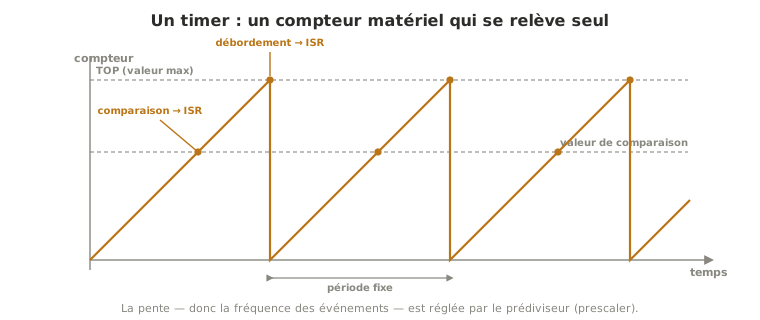
A timer (also called a hardware counter) is a circuit inside the microcontroller that counts clock pulses on its own, alongside the program and without troubling the processor. Because it counts time in place of the code, it serves to measure a duration, to pace an event at a regular interval, to generate a PWM signal, or to watch a deadline, all without blocking the main program.
What is it for?
Counting time “by hand” in the program — stacking delay() calls or counting loop iterations — raises two problems: it is imprecise (the duration depends on whatever else the loop is doing) and, with delay(), it blocks everything else. A timer solves both at once: it counts in hardware, at a steady rate independent of the program.
Four uses follow from this:
- measuring a duration — how much time went by between two events (a stopwatch, working out a speed);
- pacing — triggering an action at a perfectly regular interval (sampling a sensor, refreshing a display, running a control loop);
- generating a PWM signal — a timer produces the square wave on its own, and you set its duty cycle;
- watching a deadline — spotting that an expected event has not arrived in time (the principle behind the watchdog).
The point that often surprises: the delay() and millis() functions are not magic, they rest on a timer themselves, one that runs in the background (see delay() vs millis() for Arduino, sleep() vs ticks_ms() for MicroPython).
How does it work?
A timer is built around four elements.
- The clock source. The timer counts the pulses of a clock derived from the microcontroller’s system clock. That steady base is what gives the count its value as a measure of time.
- The prescaler. Before being counted, the clock frequency is divided by an adjustable factor (2, 8, 64, 256…). This setting arbitrates between resolution (a small prescaler means fine counting, but it saturates quickly) and maximum measurable duration (a large prescaler means long durations, but a coarser grain). It is the central parameter for setting the pace.
- Counting and overflow. The counter increments up to its maximum value (TOP), fixed by its width — 8 bits (up to 255) or 16 bits (up to 65535) — then overflows: it goes back to zero. That overflow is an event the timer can signal.
- The compare match. You can set an intermediate target value. When the counter reaches it, an event fires. That is what lets you set an exact period or frequency, without waiting for a full overflow.
On every overflow or compare match, the timer can do two things: act directly on a pin (toggle its state, which is how it generates a PWM), or raise an interrupt that runs a routine at a regular interval. The rate of those events follows a simple logic: clock frequency ÷ (prescaler × count value).
Example — Sampling at a precise interval
A signal-processing or control loop has to read a sensor at a rigorously constant rate, say exactly 100 times a second, that is every 10 ms. A control law designed for a 10 ms step goes out of tune if the step varies.
Counting time inside the loop (millis() plus a comparison), the real interval drifts: depending on whether the loop is displaying, computing or waiting, one iteration does not always take the same time, and the gap between two readings fluctuates. For a rough measurement that is harmless, but for regular processing it falsifies the maths.
With a timer set to fire an interrupt every 10 ms, the reading lands at a perfectly regular interval, whatever the loop happens to be doing at that moment. The sampling step becomes a hardware guarantee, not a hope. That is why any serious paced measurement — acquisition, filtering, control — leans on a timer rather than on a software count.
Pitfalls
Confusing a hardware timer with software timing. delay() and millis() use a timer, but they count on the software side: delay() blocks, and the rate of a millis() loop drifts. The hardware timer acts on its own and stays precise. For a rigorous rate, it is the one you configure.
Getting the prescaler and resolution trade-off wrong. Too small a prescaler overflows the counter very quickly, so the measurable duration is short. Too large, and the measurement grain becomes coarse. The right setting depends on the duration and the precision you are after.
Believing a timer is infinitely precise. Its precision is that of the clock feeding it. A crystal is stable, but an internal oscillator drifts with temperature. For a demanding time base, the quality of the clock counts.
Forgetting that timers are a scarce, shared resource. A microcontroller has only a handful, and plenty of everyday functions already take some (see Special case). Reconfiguring a timer without knowing who is using it silently breaks something else.
A timer routine that runs too long. When an overflow raises an interrupt, the routine attached to it obeys the same rules as any ISR: short, no delay(), shared variables marked volatile. If it has not finished before the next overflow, the system drowns.
Special case — A scarce, shared resource
A microcontroller has only a handful of timers (three on an Arduino Uno). Yet several heavily used functions already draw on them, most often without the beginner noticing: millis() and delay() take one of them, PWM generation through analogWrite() occupies others, and libraries such as Servo or tone generation requisition their own. Configuring a timer for your own use therefore means choosing which one to sacrifice, knowing what it was driving, on pain of seeing delay() go out of tune or a servo shake. Which timers are free on Arduino, and how they clash, is covered in the dedicated tutorial. For MicroPython, the Timer class is covered in Using a hardware timer in MicroPython.
See also
- Microcontroller — the chip that carries the timers
- Timers on Arduino — putting it to work (library and registers)
- Timers in MicroPython — the same mechanics for MicroPython
- Interrupt — what an overflow or a compare match raises to run a periodic routine
- PWM — the signal a timer generates, whose duty cycle you set
- delay() vs millis() — software timing on Arduino, built on a timer
- sleep() vs ticks_ms() — the same software timing for MicroPython
- Watchdog — a counter dedicated to watching a deadline
- Deep sleep — a timer can wake a sleeping microcontroller at a set time
- Non-blocking programming — software pacing, which the timer guarantees where a cooperative loop drifts