The HAL (Hardware Abstraction Layer) is STMicroelectronics’ native API for driving the peripherals of an STM32: GPIO, UART, timers, ADC, buses… It is the API that the code generated by CubeMX uses by default. It is portable (the same HAL_UART_Transmit call works from an F0 to an H7), at the price of a little verbosity. Learning the HAL means learning to program the microcontroller once it is configured: the natural sequel to CubeMX. For the language itself, see C++; to structure the whole, firmware.
What is it for?
The HAL answers a problem: driving an STM32 peripheral “by hand” means writing the right bits into the right registers, in the right order. That is tedious and hardly portable. The HAL wraps those sequences into readable functions common to the whole range:
- Readability.
HAL_UART_Transmit(&huart2, ...)says what it does. The equivalent register sequence does not. - Portability. Code written with the HAL carries over from one STM32 chip to another with few changes, an asset when reusing a project baseline.
- Consistency with CubeMX. The handles the HAL works on are precisely what CubeMX generates: the two tools are made to go together.
The HAL is not the only layer: for raw performance, you drop down to LL or to the register. But it is the right default for most of a project.
The handles
Every peripheral is represented by a handle structure, generated by CubeMX: UART_HandleTypeDef huart2, TIM_HandleTypeDef htim3, ADC_HandleTypeDef hadc1… The handle holds the whole configuration of the peripheral (pins, baud rate, mode…). HAL functions take the address of the handle as their first argument:
HAL_UART_Transmit(&huart2, (uint8_t *)"Bonjour\r\n", 9, HAL_MAX_DELAY);You do not create these handles yourself: you configure them in CubeMX and use them in the code. Picking the right handle (&huart2, not &huart1) is a frequent source of mistakes.
The three modes of a peripheral
One and the same peripheral is driven in three ways with the HAL, from the simplest to the most efficient. Understanding that choice is the heart of the HAL.
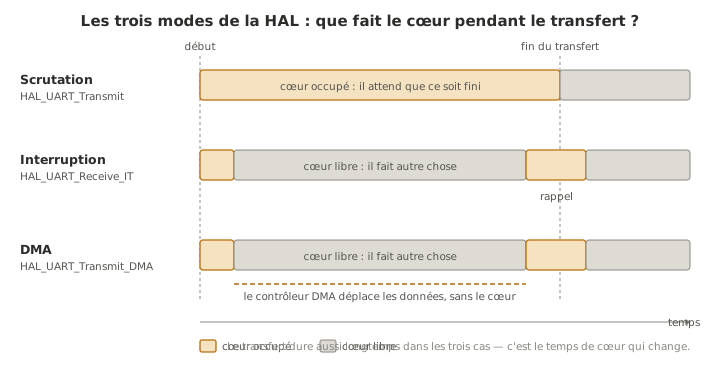
Polling (blocking). The function does the work and returns once it is finished (or after a timeout). Simple, but it freezes the program for the duration of the operation.
HAL_UART_Transmit(&huart2, data, len, 100); // blocks until the end, or 100 msInterrupt. The _IT function starts the operation and returns at once. When the operation is finished, the HAL calls a callback that you write. The core stays free in the meantime. It requires the peripheral’s interrupt to be enabled in the NVIC (a tick box in CubeMX).
HAL_UART_Receive_IT(&huart2, &rx, 1);          // arms the reception of one byte

void HAL_UART_RxCpltCallback(UART_HandleTypeDef *huart) {
  // called automatically when a byte is received
  HAL_UART_Receive_IT(&huart2, &rx, 1);        // re-arm for the next one
}
DMA (Direct Memory Access). The _DMA function hands the transfer to a dedicated controller that moves the data without the core. A callback signals the end. Ideal for large volumes (audio, display, blocks of measurements). It requires a DMA channel configured in CubeMX.
HAL_UART_Transmit_DMA(&huart2, buffer, taille); // the DMA takes care of itTip
Which mode should you pick? Polling for the simple and the occasional (a debug message). Interrupt to react to an event without blocking (incoming bytes, end of an ADC conversion). DMA for large, regular transfers. You often start in polling and move to interrupt or DMA when the blocking becomes a nuisance, exactly the logic of the interrupt and of structuring the firmware.
HAL or LL
Alongside the HAL, ST ships the LL layer (Low-Layer): very thin functions, often inline, which are almost register writes in disguise (LL_GPIO_SetOutputPin(GPIOA, LL_GPIO_PIN_5)). Compared with the HAL:
- HAL — portable, readable, a little overhead and memory; the default.
- LL — close to the register, fast, compact, less portable; for performance-critical paths or chips with very little memory.
You mix the two without trouble, peripheral by peripheral: HAL everywhere, LL where it counts. The choice is made in CubeMX (Project Manager → Advanced Settings → Driver Selector) and it is exclusive for one and the same peripheral: a given USART is generated in HAL or in LL, never in both at once. The layer below that again, direct register access, is the subject of going down to the register.
Example — Button, LED and serial port with the HAL
On a Nucleo configured in CubeMX (LD2 as an output, B1 as an input on PC13, USART2 at 115200), this program lights the LED for as long as the button is held and announces every change on the serial port, all in HAL, in polling:
/* USER CODE BEGIN 3 */
GPIO_PinState etat = HAL_GPIO_ReadPin(B1_GPIO_Port, B1_Pin);

if (etat == GPIO_PIN_RESET) {              // B1 pressed = low level on a Nucleo
  HAL_GPIO_WritePin(LD2_GPIO_Port, LD2_Pin, GPIO_PIN_SET);
} else {
  HAL_GPIO_WritePin(LD2_GPIO_Port, LD2_Pin, GPIO_PIN_RESET);
}
HAL_Delay(20);                             // simple debounce
/* USER CODE END 3 */
To move the serial reception to interrupt mode (echoing the characters received, without blocking the loop), you arm the reception once and write the callback, inside the USER CODE zones:
/* USER CODE BEGIN PV */
uint8_t rx;
/* USER CODE END PV */

/* USER CODE BEGIN 2 */         // once, after the init
HAL_UART_Receive_IT(&huart2, &rx, 1);
/* USER CODE END 2 */

/* USER CODE BEGIN 4 */
void HAL_UART_RxCpltCallback(UART_HandleTypeDef *huart) {
  HAL_UART_Transmit(&huart2, &rx, 1, 10);   // sends the received byte back
  HAL_UART_Receive_IT(&huart2, &rx, 1);     // re-arms the reception
}
/* USER CODE END 4 */
The main loop stays free while the characters are received and echoed “in the background” by the interrupt. This is the move from blocking to reactive, the gesture that tells a firmware that waits from a firmware that reacts.
The program says nothing of its own: it only returns what it receives. Typing hello into the monitor’s input box, the board returns:
hello
Character by character, in fact: five trips through the callback. And all the while the LED keeps following the button: that is the proof that the loop never waited.
Pitfalls
Forgetting HAL_Init() or SystemClock_Config(). CubeMX places them at the top of main. In hand-written code, leaving them out leaves the HAL or the clock uninitialised and nothing works. Check that they are there before anything else.
Blocking on an infinite timeout. HAL_UART_Transmit(..., HAL_MAX_DELAY) waits indefinitely. If the link is silent, the whole program freezes. Prefer a finite timeout when blocking is risky, or move to interrupt/DMA.
Interrupt not enabled in the NVIC. Using HAL_..._IT without ticking the peripheral’s line in CubeMX’s NVIC tab: the callback is never called, without any build error. The number one trap of interrupt mode.
Forgetting to re-arm the _IT reception. One HAL_UART_Receive_IT triggers only one callback. Without re-arming it inside, you only ever receive the first byte.
Wrong handle. Passing &huart1 instead of &huart2 (or one timer for another): the peripheral you address is not the one you think.
HAL_Delay inside an interrupt. HAL_Delay relies on the SysTick interrupt. Calling it from a callback of higher or equal priority can block for good. Do not wait inside an interrupt: do the strict minimum there.
Exercises
Exercise 1 — Blocking or not?
In the example, the main loop calls
HAL_Delay(20)on every pass. During those 20 ms, what happens if a character arrives on the serial port in interrupt mode? And in polling mode (blockingHAL_UART_Receive)?
Solution
In interrupt mode, the character is received and handled even during the
HAL_Delay: the interrupt briefly suspends the loop, runs the callback, then returns: theHAL_Delaydoes not get in the way of the reception. In blocking polling, the program would have to be right at that instant on theHAL_UART_Receivecall to catch the byte. During theHAL_Delay, a character that arrived would be missed. That is the whole point of the interrupt: decoupling the event from the loop. See interrupt.
Exercise 2 — HAL or LL?
You have to generate a square wave as fast as possible by toggling a pin in a tight loop. Is
HAL_GPIO_TogglePinorLL_GPIO_TogglePinthe better choice? Why? And which solution would be better still?
Solution
LL_GPIO_TogglePinis faster thanHAL_GPIO_TogglePin: the LL function is a thin wrapper (often inline) around the register write, without the checks and the handle indirection of the HAL. For a software square wave, LL toggles the pin in far fewer cycles. But the best solution is neither: a hardware timer in PWM generates the signal without the core, at a stable frequency, the role of timers. General rule: for performance, drop down to LL or the register; for a periodic signal, hand the work to a dedicated peripheral.
Where it fits in the project
- Step 4 of the proof-of-concept phase. The HAL is the tool for writing the logic of the PoC once the microcontroller is configured. Picking the right mode (polling / interrupt / DMA) as early as the PoC saves rewriting everything when blocking becomes a problem.
- Readability and hand-over. HAL code is read back and picked up more easily than register code, which counts in team projects and in the technical file.
Understanding the three modes (and that CubeMX configures the handles the HAL works on) gives the grammar of the native STM32: configure on one side, drive on the other, choosing the right level of reactivity every time.
Going further
- Going down to the register — the layer beneath the HAL and the LL, and why you would go there.
- Configuring with CubeMX — where the handles and the NVIC enabling come from.
- Interrupts · Timers — the cross-cutting concepts behind the
_ITmodes and PWM. - ST’s HAL/LL documentation (UM1725 and equivalents) — description of the functions family by family.
See also
- STM32 — hub of the STM32 tutorials
- Configuring with CubeMX — the step before: configuring the peripherals
- Going down to the register — beneath the HAL, direct access to the hardware
- Programming with the Arduino core — the door of continuity, laid on this same HAL
- Firmware — structuring the code, from the super-loop to an RTOS (cross-cutting)