Bit manipulation means reading and changing the individual bits of a number, using the bitwise operators (& | ^ ~ << >>). It is the basic way of talking straight to a microcontroller’s hardware — turning on a pin, configuring a timer, setting up a peripheral — wherever each bit of a register commands a precise function. Four idioms cover everyday work: set a bit to 1, clear it to 0, toggle it, test it.
What is it for?
In embedded work, a large share of a microcontroller’s settings live in registers: bytes where each bit commands a separate function. To change one setting without disturbing the others, you have to act on its bit alone. That is exactly what masking allows. Without this technique, you wipe out one setting while trying to change another.
Two other uses come up often:
- saving memory — packing eight booleans into a single byte instead of eight variables, which matters when SRAM is tiny;
- understanding the code “under the hood” — libraries hide the registers, but reading or fine-tuning a peripheral means coming back to them.
It comes up during proof of concept, as soon as you configure a peripheral beyond what a library exposes.
How to work with bits
A binary reminder. A byte is 8 bits numbered from 0 (least significant, on the right) to 7. In C++, the 0b prefix writes a number in binary (0b00101101). The expression 1 << n shifts a 1 by n positions to the left: it builds a mask that isolates exactly bit n. The same operators exist identically in MicroPython, where the idioms below carry over word for word.
The operators. Each has its own job:
&(AND) — 1 only if both bits are 1 → used to test and to clear;|(OR) — 1 if at least one bit is 1 → used to set;^(exclusive OR) — 1 if the bits differ → used to toggle;~(NOT) — flips every bit → used to build an inverted mask;<<and>>— shift the bits → build a mask, or multiply/divide by two.
The four idioms. Everything comes down to these four moves, where n is the number of the bit you are after:
byte r = 0b00101001;

r |=  (1 << n);          // set bit n to 1
r &= ~(1 << n);          // clear bit n to 0
r ^=  (1 << n);          // toggle bit n
bool actif = r & (1 << n);   // test bit n (non-zero if set)
Masking acts on the targeted bit only, the others stay untouched:
  value           0b0010 1001
  mask            0b0000 0100     (1 << 2)
  value | mask      0b0010 1101     -> bit 2 goes from 0 to 1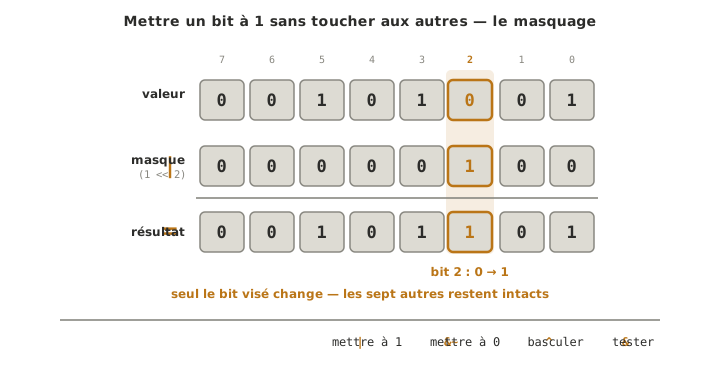
Example — Eight flags in one byte
Rather than eight bool variables (eight bytes), eight states go into a single byte, one bit per state. Named constants keep the code readable despite the binary machinery.
const byte CAPTEUR_OK = 0;     // bit 0
const byte MOTEUR_ON  = 1;     // bit 1
const byte ERREUR     = 2;     // bit 2

byte etats = 0;                // every flag at 0 to start with

etats |=  (1 << MOTEUR_ON);    // the motor starts    -> bit 1 set to 1
etats &= ~(1 << CAPTEUR_OK);   // the sensor drops out -> bit 0 cleared to 0

if (etats & (1 << ERREUR)) {   // has an error been raised?
  // ... handle the error
}
The same byte carries eight independent pieces of information, each one changeable without touching the others. This is exactly how a hardware register works, except that here we are the ones deciding what each bit means.
Special case — A microcontroller’s registers
This is the most common use on a project. Every peripheral (timer, I/O port, serial link) is configured through registers where each bit switches on a function. The “set to 1” idiom applies directly:
TCCR1B |= (1 << WGM12); // switches on CTC mode of Timer1, without touching the other bitsWGM12 is only a name given to a bit number (defined by the chip’s header files). You write |= and not = so that only that bit changes: a plain = would wipe out every other setting in the register. Which bit commands which function is spelled out in the microcontroller’s datasheet. This example is specific to the AVR (the ATmega328P on the Uno). Another microcontroller has different registers, but the technique is identical. On a project, a library is almost always enough (see timers on Arduino). This level only serves fine-tuning, or reading code someone else wrote.
Pitfalls
Mixing up & / | (bitwise) and && / || (logical). The first pair works on each bit, the second on true/false conditions. Swapping them produces a wrong result that compiles without error.
Forgetting the brackets. Bitwise operators have lower precedence than ==: x & 1 == 0 is read as x & (1 == 0). Always bracket: (x & 1) == 0.
Clearing a bit without the ~. r &= (1 << n) does not clear bit n. It clears all the others. The clearing mask is the inverted one: r &= ~(1 << n).
Wiping a register with =. TCCR1B = (1 << WGM12) resets every other bit in the register to zero. To touch a single bit, it is |= (set) or &= ~ (clear).
A shift that overflows the type. 1 << 20 overflows if 1 is a 16-bit int (AVR): the constant inherits the int type. Force a wide enough type with 1UL << 20.
See also
- The C++ language — the operators and the types, the foundation of bit manipulation
- ASCII code — a character is a byte: its value is its code
- Timer · Timers on Arduino — the direct application: setting up a timer through its registers
- Reading a datasheet — the map of the registers: which bit commands which function
- GPIO · O — the port registers that drive the pins
- Microcontroller — where the registers live