The ASCII code (American Standard Code for Information Interchange) is a table that maps every character of text — letters, digits, punctuation — to a number between 0 and 127. It is the convention by which a board and a computer exchange text: on the wire, a character is never “the letter A”, it is byte 65.
What is it for?
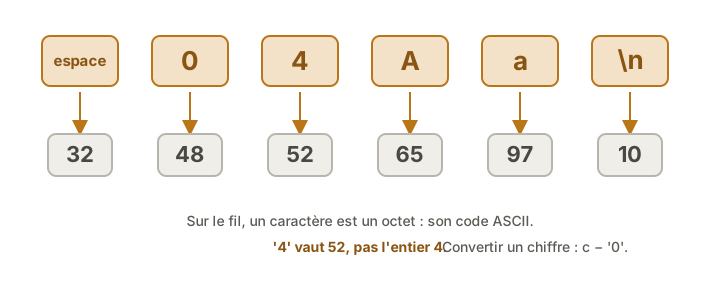
Understanding ASCII means understanding why a program does not “see” text the way we do. When 4 is typed into the serial monitor, the board does not receive the integer 4: it receives byte 52, the code of the character '4'. Hence the classic Serial.read() trap: receiving '4' then '2' (52 then 50) instead of the number 42.
That character / number distinction turns up everywhere in embedded work:
- Serial link. Every byte received is an ASCII code. Reading a number means rebuilding the digits one by one (or letting
Serial.parseInt()do it). - The
chartype. In C++, acharis an 8-bit integer (see typing variables):'A'and65are the same value, and'A' + 1is'B'. - Digit ↔ value conversion. The code of a digit follows by an offset: since
'0'is 48, digitnis written'0' + n, and a digit character is turned back into a value withc - '0'.
A few landmarks
The ranges worth knowing (the rest is in any ASCII table):
- “0”–“9” → 48 to 57 (
'0'= 48) - “A”–“Z” → 65 to 90 (
'A'= 65) - “a”–“z” → 97 to 122 (
'a'= 97, that is 32 more than the capitals) - space → 32
- line feed
\n→ 10, carriage return\r→ 13 - 0 to 31 → control characters (non-printable: tab, end of line…); 32 to 126 → printable characters.
To find a precise code, the full table can be read at a glance:
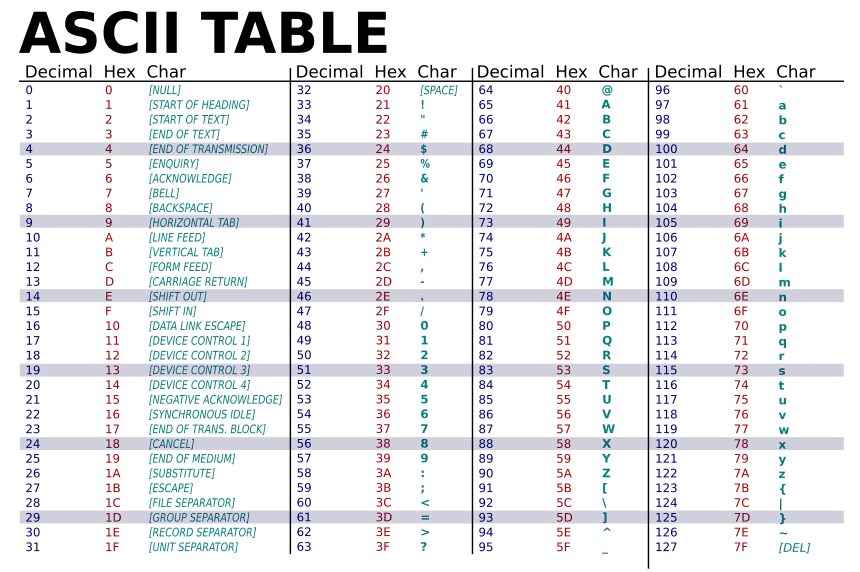
Every row describes one character and reads from left to right, over three columns:
- Decimal — the base 10 code, the 0-127 number handled so far (
'A'= 65). - Hex — the same value written in base 16, noted
0x..: this is the form datasheets, memory dumps and the serial monitor in HEX mode display.'A'= 65 in decimal is written0x41in hexadecimal. Both designate the same byte, only the writing base changes. - Char — the character itself, or its name between brackets for codes 0 to 31, which do not print (
[LINE FEED]=\n= 10 =0x0A,[CARRIAGE RETURN]=\r= 13).
The four blocks simply follow one another: 0-31 (control), 32-63 (space, digits, punctuation), 64-95 (capitals), 96-127 (lower case).
Tip
Three anchors are enough. There is no point learning the whole table: space = 32,
'0'= 48,'A'= 65. And lower case letters are 32 further along than capitals. Everything else follows.
Beyond 127 — Unicode and UTF-8
Original ASCII covers only 128 values (7 bits): no é, no €, none of the non-Latin alphabets. Characters beyond that belong to UTF-8 (the standard of the web and of modern files), where an accented character takes several bytes. A concrete consequence: "é" is not one byte but two, and a C++ char cannot hold it on its own. Over a serial link, handling accented text character by character through Serial.read() breaks the accents: one more reason to stick to ASCII (a–z, 0–9, plain punctuation) in embedded protocols.
See also
- Arduino serial monitor — where the character/number trap is first met (
Serial.read()) - ESP32 serial monitor — the same character/number trap on the ESP32 side
- Typing variables — the
chartype, an 8-bit integer that carries an ASCII code - Bit manipulation — a character is a byte, and can be handled bit by bit
- C++ — the language where
'A'and65are interchangeable