Programming an external interrupt in MicroPython means tying a function — the interrupt service routine (ISR) — to a pin, through the Pin.irq() method, so that it runs automatically on every edge of the signal, without the loop having to watch the pin. It is the tool for counting fast pulses or reacting instantly to an event, even when the loop is busy. One advantage of the Pico: every GPIO accepts an interrupt, not just two as on an Uno.
What is it for?
Reading a pin inside the loop is not enough when the signal is too brief or the loop too busy: the pulse slips between two passes and is never seen. An interrupt settles the question: the pulse is caught by the hardware at the exact instant, the reaction is immediate, and the loop stays free between two pulses. It is the reflex as soon as you are counting the ticks of a speed sensor, the passes of a flow meter, the notches of an encoder, or reacting without delay to a critical button. You put one in place during the proof of concept.
Step by step
Four steps: write a short ISR, attach it with irq(), read its result cleanly, respect the allocation rule.
1. Write the ISR
The ISR is a function that takes the pin as an argument and stays minimal: here, incrementing a counter. The shared variable is a global (declared global inside the function). In Python there is no volatile keyword: a global is always “volatile” in practice, but another rule, specific to MicroPython, takes its place (step 4).
import micropython
micropython.alloc_emergency_exception_buf(100)   # pour voir les erreurs d'ISR

impulsions = 0

def compter(pin):                 # l'ISR : recoit la broche, reste courte
    global impulsions
    impulsions += 1
alloc_emergency_exception_buf sets aside enough room to print a trace if the ISR raises an error (otherwise it fails silently) — to be called once at the top of the program.
2. Attach the interrupt
Pin.irq() ties together the pin, the ISR and the trigger edge:
from machine import Pin

capteur = Pin(2, Pin.IN, Pin.PULL_UP)
capteur.irq(trigger=Pin.IRQ_FALLING, handler=compter)
The edge: Pin.IRQ_RISING (rising), Pin.IRQ_FALLING (falling), or both (Pin.IRQ_RISING | Pin.IRQ_FALLING). To count pulses, use a single edge (count once per pulse, not twice). capteur.irq(handler=None) disables it.
3. Read the counter cleanly
The loop reads the counter without blocking. Since it is shared with the ISR, we copy it inside a critical section — interrupts switched off for the duration of the copy — through disable_irq()/enable_irq(). The display rate comes from [[micropython-temporisation-en|ticks_ms()]]:
from machine import Pin, disable_irq, enable_irq
from time import ticks_ms, ticks_diff

t_aff = ticks_ms()
while True:
    if ticks_diff(ticks_ms(), t_aff) >= 1000:      # une fois par seconde
        t_aff = ticks_ms()
        etat = disable_irq()                       # section critique
        n = impulsions
        impulsions = 0
        enable_irq(etat)
        print(n, "pulses/s")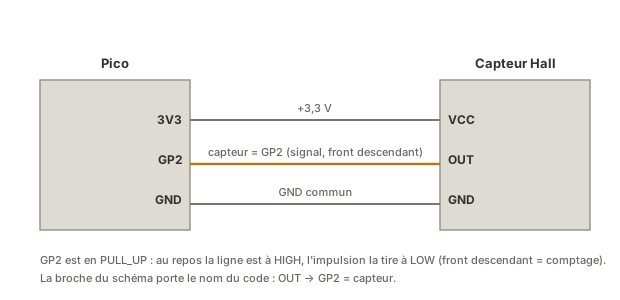
4. Respect the allocation rule
A rule specific to MicroPython: inside a “hard” ISR, you cannot allocate memory. No object creation, no formatted print, no floating-point computation that allocates. We limit ourselves to modifying variables that already exist (a counter, a flag). To do real work, we defer it out of the ISR with micropython.schedule():
def afficher(arg):                 # contexte planifie : allocation autorisee
    print("event detected")

def isr(pin):
    micropython.schedule(afficher, 0)   # demande l'execution hors de l'ISR dure
Example — A Hall effect speed counter
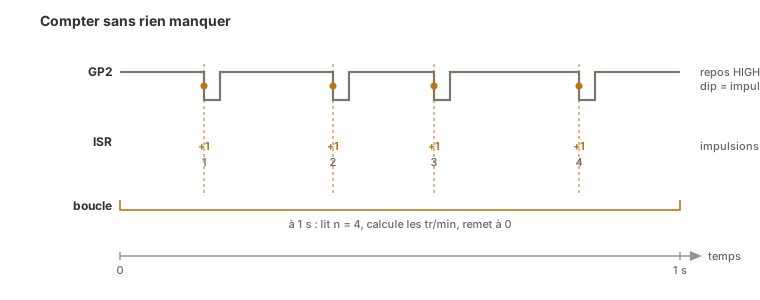
A Hall sensor detects a magnet fixed to a wheel going past: one brief pulse per revolution. At high speed those pulses are too close together to be read inside the loop — a textbook case for an interrupt. We count by interrupt. The loop works out the speed once a second.
from machine import Pin, disable_irq, enable_irq
from time import ticks_ms, ticks_diff
import micropython
micropython.alloc_emergency_exception_buf(100)

IMPULS_PAR_TOUR = 1                # 1 aimant => 1 impulsion par tour
capteur = Pin(2, Pin.IN, Pin.PULL_UP)
impulsions = 0

def compter(pin):                  # ISR : une impulsion de plus
    global impulsions
    impulsions += 1

capteur.irq(trigger=Pin.IRQ_FALLING, handler=compter)

t_aff = ticks_ms()
while True:
    if ticks_diff(ticks_ms(), t_aff) >= 1000:
        t_aff = ticks_ms()
        etat = disable_irq()
        n = impulsions
        impulsions = 0
        enable_irq(etat)
        tr_min = (n / IMPULS_PAR_TOUR) * 60        # calcul dans la boucle
        print(tr_min, "rpm")
How to read this code
Once a second, the loop takes a reading of the counter. The copy
n = impulsionsand then the resetimpulsions = 0are wrapped in the critical sectiondisable_irq()/enable_irq()(see step 3): we read and reset without a pulse slipping between the two. Counting over one second then starting again from zero turns a total into a frequency. The last line converts it into revolutions per minute (× 60). All the computing is in the loop: the ISR does nothing but increment, with no allocation.
The ISR does nothing but increment. All the computing (conversion to rpm, display) happens in the loop, where allocation is permitted and where the time spent computing gets in nobody’s way. The loop stays responsive and no pulse is lost.
Pitfalls
Allocating inside the ISR. Creating an object, running a formatted print or a floating-point computation inside a hard ISR raises an error (often a silent one without alloc_emergency_exception_buf). The ISR touches nothing but existing variables. The rest goes through micropython.schedule() or the loop.
Reading the counter without a critical section. A read plus a reset is not atomic: if the interrupt lands between the two, a pulse is lost. Wrap it in disable_irq()/enable_irq().
Forgetting global. Without global impulsions, the function creates a local variable and the loop’s counter never moves.
Counting a mechanical button with no debouncing. A button bounces: one press can generate several edges. An interrupt does not filter the bounce — to count presses, add debouncing (store the ticks_ms() of the last edge and ignore the ones that follow within a short window).
Doing too much work on every pulse. If the ISR has to do more than increment or store, the work belongs to the loop. The ISR signals, the loop handles.
Not setting aside the exception buffer. Without alloc_emergency_exception_buf(100), an error inside the ISR fails with no message — which makes debugging very hard.
Special case — Spreading the work out with micropython.schedule
When the event calls for real work (allocation, communication), we do not do it inside the hard ISR: we call micropython.schedule(function, argument), which runs function as soon as possible outside the ISR, in a context where allocation is allowed. It is the clean bridge between immediate capture (hardware) and rich processing (full Python).
Where it fits in the project
- Step 2 of the proof-of-concept phase — capturing a fast sensor signal (speed, flow, position) on an isolated bench.
- Step 3 of the integration and testing phase — measurement by interrupt, validated on its own, then feeds the control loop of the complete system (a revolution count feeding a speed control loop).
Getting the Pin.irq plus atomic read pairing right on a simple counter gives you the reusable reflex for any signal too fast to poll.
See also
- Interrupt — the parent concept: mechanism, ISR, atomicity (worth understanding before writing code)
- MicroPython — hub for the module
- sleep() vs ticks_ms() — pacing the display without blocking
- Reading a digital input — debouncing, for counting presses
- Hardware timers — the other source of interrupts: pacing at a regular interval
- External interrupt (Arduino) — the C++ equivalent (
attachInterrupt,volatile)