Managing memory in MicroPython means living with a scarce resource (a microcontroller has little RAM) and with the Python interpreter, which takes a share of it. The big difference from the Arduino: MicroPython has a garbage collector (the gc module) that automatically frees the memory it no longer needs. You therefore do not manage memory by hand (there is no F() or PROGMEM), but you keep an eye on two enemies: heap fragmentation and the pauses of the garbage collector. The gc module is what lets you measure and take back control.
What is it for?
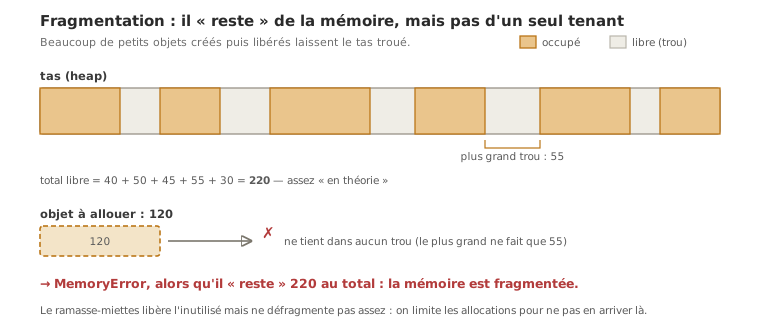
On a computer, memory looks infinite. On a microcontroller, it is counted. And in MicroPython, the interpreter already occupies part of it, leaving less usable RAM than the raw size of the chip. A program that creates objects in a loop (strings, lists) can fragment the heap to the point where an allocation fails, even though there is memory “left” in theory. The symptom: a MemoryError, or pauses when the garbage collector fires. Knowing how to measure and how to limit allocations is a survival skill as soon as a project grows. The question comes up in the proof of concept, when the code outgrows the example.
Step by step
Four steps: measure the RAM, understand the garbage collector, limit the allocations, move code out to flash.
1. Measure the RAM with gc
You do not guess, you measure. The gc module gives the free and used memory; micropython.mem_info() a detailed report:
import gc, micropython

print("free RAM :", gc.mem_free())        # bytes available
print("used RAM :", gc.mem_alloc())
micropython.mem_info()                     # detailed report (fragmentation)
Printing gc.mem_free() at various points shows where the memory is melting away and pinpoints a leak.
2. Understand the garbage collector
MicroPython automatically frees the objects that are no longer referenced, but at moments it chooses itself, which can introduce a pause at the wrong time (inside a control loop, for instance). You can force a collection at a moment you control:
gc.collect() # free now, rather than suffering a pause later onCalling gc.collect() at a quiet point in the loop (never in an ISR, never in a critical section) avoids surprise pauses.
3. Limit the allocations (the real discipline)
The heap fragments when you create a lot of small short-lived objects. Two reflexes:
- do not build up strings or lists inside a loop — every
+=on a string creates a new object. Deal with the values as they come, or build once (",".join(...)); - reuse pre-allocated buffers — a
bytearraycreated once and rewritten (withmemoryviewfor slices) rather than a new object on every pass.
And for integer constants, const() stores them more efficiently than a variable does:
from micropython import const
TAILLE_TAMPON = const(64)        # integer constant, compiled efficiently
4. Move code out to flash (the counterpart of F())
Where the Arduino keeps text in flash with F() and PROGMEM, MicroPython freezes modules into the firmware (frozen bytecode, or .mpy files): the code then runs from flash without being loaded into RAM, which saves a great deal of RAM for large modules and libraries (see libraries). It is the main lever when the interpreter and the libraries together saturate the memory.
At the REPL, the effect of a collection is directly visible:
>>> import gc
>>> gc.mem_free()
XXXXX
>>> gc.collect()
>>> gc.mem_free()
XXXXX
The second value is larger than the first: what has just been handed back is the objects that had become unreachable. The gap between the two measures what the program was leaving lying around. Take the reading on your own board, since it depends on the firmware and on the modules imported.
Example — Diagnosing a MemoryError caused by accumulation
A program reads a sensor in bursts and piles the values into a string. After a while: a MemoryError, or pauses. The culprit: a new string created on every pass.
# BEFORE - allocates and fragments on every pass
def lire_rafale(capteur, n):
    resultat = ""
    for _ in range(n):
        resultat += str(capteur.read_u16()) + ","   # a new string on every +=
    return resultat
Rewritten so that nothing builds up (the values are dealt with as they come), or so that the string is built in one go:
# AFTER (option 1) - dealt with straight away, nothing swells
def lire_rafale(capteur, n):
    for _ in range(n):
        print(capteur.read_u16())

# AFTER (option 2) - a single allocation at the end
def lire_rafale(capteur, n):
    valeurs = [capteur.read_u16() for _ in range(n)]
    return ",".join(str(v) for v in valeurs)
The general method: measure gc.mem_free(), spot the objects created inside loops, remove them or group them, and put a gc.collect() at a quiet point. On a program that runs for a long time, the difference is spectacular, and the MemoryError goes away.
Pitfalls
Believing the garbage collector excuses everything. It frees what is unused, but it does not defragment enough: creating a lot of small short-lived objects fragments the heap, and a large allocation can fail even though there is memory “left”. Limiting the allocations is still necessary.
Putting up with the pauses of the garbage collector. An automatic collection can land in the middle of a control loop and add latency. Calling gc.collect() at a moment you choose (a quiet point in the loop) takes back control.
Building up strings inside a loop. Every += on a string creates a new object — the number one cause of fragmentation. Deal with the values as they come, or ",".join(...) once.
Allocating inside an ISR. Creating an object inside an interrupt (or a timer callback) is forbidden: no allocation in interrupt context. Pre-allocate, and only handle objects that already exist.
Forgetting that the interpreter occupies RAM. The usable RAM is less than the raw size of the chip (the interpreter and the imported modules take their share). Measuring gc.mem_free() at start-up gives the real headroom.
Importing large modules without freezing them. A large module loaded into RAM can saturate it on its own. Freezing it into the firmware (or .mpy) makes it run from flash — the MicroPython counterpart of keeping code in flash.
Special case — bytearray and memoryview
To handle blocks of data (frames, sensor buffers) without reallocating, you create one bytearray once and rewrite it in place. memoryview lets you take slices of it without copying. This is the technique for processing a stream (UART, SPI, audio) on little RAM without fragmenting the heap — the opposite of creating throwaway objects on every pass.
Where it fits in the project
- Proof of concept phase — as soon as the code outgrows the example (several sensors, a display, logging), watch
gc.mem_free()and limit the allocations before you hit the RAM wall. - Integration and testing phase — integrating several functions adds up their memory needs. A RAM budget held function by function avoids the
MemoryErrorthat only shows up once everything is assembled.
Anticipating memory avoids the most tiresome situation in embedded work: a program that used to work, that crashes once a feature is added (here a MemoryError or pauses) and that you then hunt down for want of having looked at gc.mem_free().
See also
- Memory — the concept page: the kinds of memory in a microcontroller
- Using a library — freezing modules into the firmware to save RAM
- Persistent storage — keeping data after power-off (a file in flash)
- Interrupts — the rule “no allocation in interrupt context”
- MicroPython — hub of the module
- Managing memory (Arduino) — the C++ equivalent (
F(),PROGMEM, no garbage collector)