A library is a ready-made module of code that wraps up the communication with a component: ssd1306 for an OLED display, dht for a DHT11 or DHT22 sensor, a sensor driver on I2C. Instead of rewriting the protocol of a sensor on every project, you import the library and use its functions. The logic differs from the Arduino on one point: there is no manager of #include directives to compile. A MicroPython library is a .py file (or a module frozen into the firmware) that you make available on the board, then import. See also modules and import.
What is it for?
- Saving time — showing text on an SSD1306 OLED without a library takes dozens of lines of I2C plus fonts. With
ssd1306, a few lines. - Benefiting from accumulated experience — maintained libraries have already taken the subtle bugs (timing, edge cases) that you would rather not rediscover.
- Making porting easier — one library often covers several MicroPython boards.
Step by step
Four routes: recognise what is already built in, find a library, install it, import it and read its documentation.
1. Recognise the modules already built in
Some libraries are frozen into the firmware — nothing to install, just import. On the Pico: machine, time, dht, neopixel, rp2 and others. A help("modules") at the REPL lists the modules available.
2. Find a library
- micropython-lib — the official collection (sensor drivers, utilities);
- the manufacturer’s GitHub (Pimoroni, Adafruit for CircuitPython, to be adapted, community repositories);
- a search for
component_name micropythonin a search engine. Check the date of the last commit and how active the repository is.
3. Install the library
Method A — the Thonny package manager (recommended): Outils → Gérer les paquets… (Tools → Manage packages…), search for the name (ssd1306), Installer (Install). Thonny saves it on the board.
Take a screenshot of the “Gérer les paquets” window of Thonny, with the search on “ssd1306” and the Installer button visible.
Method B — mip (a board connected to the network, Pico 2 W or ESP32):
import mip
mip.install("ssd1306")
Method C — copying by hand: download the .py of the library and save it on the board (as one more file). This is the fallback route when the board has no network.
4. Import it and read the documentation
Once the .py is on the board, you import it:
from machine import Pin, I2C
from ssd1306 import SSD1306_I2C

i2c = I2C(0, scl=Pin(5), sda=Pin(4))   # I2C bus 0: SCL=GP5, SDA=GP4
ecran = SSD1306_I2C(128, 64, i2c)      # 128×64 pixel display
ecran.text("Hello", 0, 0)              # writes at the top left (x=0, y=0)
ecran.show()                           # sends the buffer to the display
Sources of documentation: the README of the repository, the examples it ships, and, for short libraries, the source code itself, which is readable Python.
Example — Reading a DHT11 with the built-in dht module
A complete case: dht is frozen into the firmware of the Pico — no installation at all.
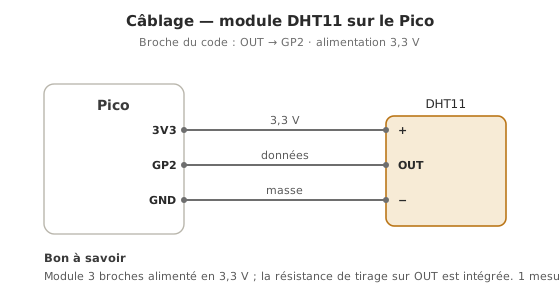
Wiring: DHT11 module, + to 3.3 V, − to GND, OUT to GP2.
from machine import Pin
import dht
from time import sleep

capteur = dht.DHT11(Pin(2))     # DHT11 sensor on GP2

while True:
    sleep(2)                 # 1 reading/s max on a DHT11; 2 s leaves some margin
    capteur.measure()        # triggers a reading (the 1-wire protocol is wrapped up)
    print("T =", capteur.temperature(), "°C   H =", capteur.humidity(), "%")
Breathe on the sensor: the humidity goes up. Before dht, reading this sensor meant coding its tightly timed 1-wire protocol by hand. The library wraps all of that up.
Pitfalls
The library is not on the board. import ssd1306 fails (ImportError) if the .py has not been saved on the board (not merely opened in Thonny). Check the files on the board.
Confusing CircuitPython with MicroPython. Many Adafruit drivers are written for CircuitPython, which is close but distinct: they may not work as they are. Look for the MicroPython version, or adapt it.
A version that does not suit the board. A driver written for the ESP32 may assume pins or a module that the Pico does not have. Check the target.
Overwriting a built-in module. Naming your own file dht.py hides the built-in dht module. Pick another name.
Memory saturated. Importing large libraries on a board with limited RAM can raise MemoryError. See memory management (compiling to .mpy, frozen modules).
Special case — .mpy files and frozen modules
To save RAM, a library can be pre-compiled to .mpy (bytecode) or frozen into the firmware (compiled together with MicroPython). Beyond the school project, this is the route for fitting a lot of code onto a constrained board — see memory management.
Where it fits in the project
- Step 2 of the proof of concept phase — with the first advanced sensor or actuator (an OLED, a BMP280), install the right library and run its example BEFORE writing any project code. That is the validation test for the hardware and the tooling together.
- Step 4 of the concept phase — the availability of a maintained MicroPython library is one criterion for choosing a component: a component with no driver adds weeks of development.
A well-chosen library is one of the biggest levers on your efficiency. Reinventing what a proven library already does, on the other hand, is paid for in bugs over time.
See also
- MicroPython — hub of the module
- Modules and import — the underlying
importmechanism - OLED display — an example of
ssd1306in use - I2C — the bus of many modules that come with a library
- Library — the cross-cutting concept page
- Using a library (Arduino) — the C++ equivalent (
#include)