Managing memory on Arduino means working with a scarce resource: a microcontroller has very little RAM (2 KB of SRAM on an Uno). Understanding which memory stores what — Flash the program, SRAM the variables, EEPROM the persistent data — and knowing how to push constants out into Flash (the F() macro, PROGMEM) is what saves you from the silent crashes of a saturated RAM, one of the most baffling bugs a beginner meets.
What is it for?
On a PC, memory looks endless. On a microcontroller it is counted out. A sketch that piles up variables, builds strings or carries big arrays can exhaust the SRAM, and the symptom is a treacherous one: no error message, just a program that restarts by itself, freezes or behaves at random. Knowing where the memory goes and how to save it is a survival skill as soon as a project grows. The question arises during the proof of concept, when the code outgrows the example sketch and starts running out of room.
Step by step
Four steps: tell the three memories apart, understand where the variables live, save RAM, and measure it.
1. Tell the three memories apart
An AVR (the Uno’s ATmega328P) separates three spaces with distinct roles:
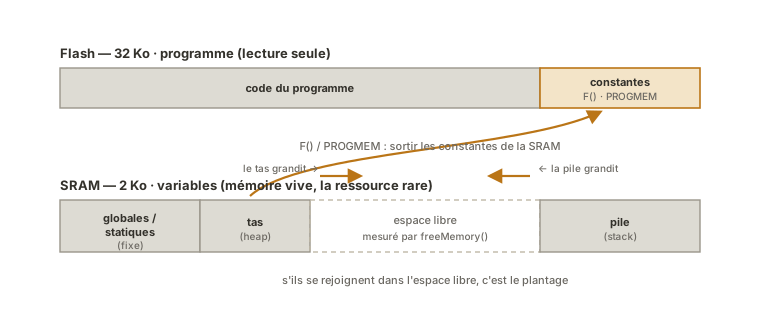
- Flash (32 KB) — the program memory: it holds the uploaded code. Large, but read-only while running. You can park constants there.
- SRAM (2 KB) — the live memory: it holds the variables handled while the program runs. Small and precious. This is the one that fills up.
- EEPROM (1 KB) — the persistent memory: it keeps a little data after power-off (settings, calibration), through its own tutorial.
The underlying rule: SRAM is the critical resource, and anything that can be moved out of it should be.
These figures, and so the pressure on RAM, belong to the AVR. An Uno R4 (32 KB of SRAM) or an ESP32 (~520 KB) loosen the constraint enormously: F() and PROGMEM are still valid there but bring almost nothing, and hunting bytes no longer means the same thing. The good habits (measure, avoid fragmenting the heap) stay useful everywhere (see ESP32).
2. Understand where the variables live in SRAM
SRAM is shared between three zones:
- the global and static variables, placed at the bottom, take a fixed share from start-up;
- the stack, which grows downwards, holds the local variables and the function calls;
- the heap, which grows upwards, serves dynamic allocation (
Stringobjects,new).
Stack and heap grow towards each other in the same small space: if they meet, the program crashes. The language details (pointers, allocation) belong to the C++ basics. Here, what matters is knowing that every variable has a cost and that the heap is the riskiest of the three.
3. Save RAM: F() and PROGMEM
The commonest waste is literal strings. By default, Serial.println("text") copies the text into SRAM at start-up. The F() macro leaves it in Flash:
Serial.println(F("This text stays in Flash, it eats no SRAM"));For bulky constant data (lookup tables, fonts, sounds), PROGMEM parks it in Flash, read on demand. And on the dynamic-text side, prefer fixed-size character arrays (char[]) to String: String objects allocate on the heap and fragment it (see the pitfalls).
4. Measure the free RAM
You do not guess at saturation, you measure it. A freeMemory() function (or the MemoryFree library) returns the space left between stack and heap. Printing it lets you watch the margin and spot a leak.
// (freeMemory() supplied by the MemoryFree library)
Serial.print(F("Free RAM: "));
Serial.println(freeMemory());
The monitor then shows the margin left, in bytes. You take three readings — at start-up, after the first allocations, then in steady state:
Free RAM: XXXX
Free RAM: XXXX
Free RAM: XXXX
What counts is not the figure but its trend: a margin that settles is healthy, a margin that shrinks pass after pass signals a leak. The values are for you to read off your own rig. They depend on the sketch and on the libraries loaded.
Example — Diagnosing a crash caused by saturation
A sketch prints messages and concatenates String objects. After a while, it restarts for no visible reason. The culprit: SRAM exhausted by the strings.
// BEFORE — wastes and fragments the SRAM
void afficher(int n) {
  String message = "Reading number ";    // allocates on the heap
  message += n;                          // reallocates, fragments
  message += ": OK";                     // again
  Serial.println(message);
}
Rewritten to keep the texts in Flash and stay off the heap:
// AFTER — texts in Flash, no dynamic allocation
void afficher(int n) {
  Serial.print(F("Reading number "));    // in Flash
  Serial.print(n);
  Serial.println(F(": OK"));             // in Flash
}
The second version never touches the heap: no fragmentation, no copy of text into SRAM. On a sketch that prints often, the difference in free RAM is spectacular, and the mysterious restart goes away. The general method: measure the free RAM, spot the String objects and the long texts, replace them with F() and char[].
Pitfalls
The String class fragmenting the heap. Concatenating String objects allocates and reallocates endlessly, leaving “holes” in the heap (fragmentation). With so little SRAM, it is the number one cause of erratic crashes. Prefer fixed-size char[] and the C string functions, or keep String for very limited use.
Forgetting F() on the texts. Every literal string without F() eats SRAM for nothing. On a talkative program, hundreds of bytes go up in smoke for no return.
Big arrays as global variables. One array of a few hundred integers in SRAM and the margin melts away. If it is constant, park it in PROGMEM (Flash); if not, rethink the need.
Recursion or large local variables. The stack is tiny: a deep recursive function or a big local array can push it into the heap. Avoid unbounded recursion on an AVR.
A time variable as int instead of unsigned long. Beyond memory, a poor type causes overflows (see timing delays): sizing types properly is part of memory management too.
Confusing a full Flash with a full SRAM. The compiler reports two figures: the program space (Flash) and the dynamic memory (SRAM). A program can fit in Flash and still run out of SRAM while running. It is that second figure you have to watch.
Special case — Reading the compilation report
After every upload, the IDE shows two lines: how much Flash the program takes, and how much SRAM the global variables reserve (with the RAM left for stack and heap). That report is the first diagnostic reflex: if the SRAM it announces is already brushing the limit before any dynamic allocation, a crash is all but certain once the program runs. Watching it on every build saves you from finding out too late.
Where it fits in the project
- Proof-of-concept phase — as soon as the code outgrows the example (several sensors, a display, logging), watch the RAM and adopt
F()andPROGMEMbefore hitting the SRAM wall. - Integration and testing phase — integrating several functions adds up their memory needs. A RAM budget held function by function saves you from crashes that only show up once everything is assembled.
Thinking ahead about memory saves you from the most painful situation in embedded work: a program that used to work, that crashes after one feature is added, with no message, and that you hunt for hours because nobody looked at the free RAM.
See also
- Memory — the concept page: the memory types of a microcontroller
- EEPROM storage on Arduino — keeping data after power-off
- The C++ language — pointers, types and allocation, at the root of memory management (cross-cutting)
- Arduino — hub for the Arduino tutorials
- Processor — the core that reaches these memories
- ESP32 — far more SRAM (~520 KB): the AVR’s memory constraint loosens a great deal there