Keeping data after the power goes off (a calibration, a mode, an event counter) is a recurring need. On the Arduino, you write to the built-in EEPROM through EEPROM.h. The Pico has no EEPROM: persistence goes through a file written to the flash memory, that is, through the MicroPython file system itself (the very one that holds your .py files). This is the major divergence from the Arduino module: no byte addressing, but files (text or JSON), which are far more convenient. For a real EEPROM, you add an external I2C EEPROM chip (24LCxx).
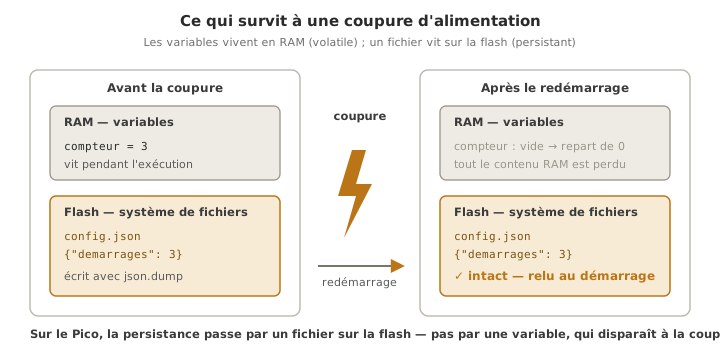
What is it for?
Typical uses: a persistent counter (start-ups, cycles, hours of use), calibration settings (offset, thresholds, mode), the last configuration (picking up where you left off), small logs.
The Pico stores this data in a file on its internal flash. The advantages over the raw EEPROM of the Arduino: you handle file names and structures (JSON) instead of byte numbers. The limits: flash has a finite number of write cycles (only write when something changes), and the file shares the flash with the code (do not fill it up).
Step by step
Four steps: understand where the data lives, read and write a file, save on writes, handle structures.
1. Understand: a file on the flash
The MicroPython file system is persistent: a file created by the program survives restarts and power cuts. You read and write it with open(), as in standard Python. import os lets you inspect it (os.listdir(), os.remove()).
2. Read and write a file (text)
# Write a value
with open("config.txt", "w") as f:        # "w" creates or overwrites
    f.write("42")

# Read it back, handling the case where the file is missing (first start-up)
try:
    with open("config.txt") as f:
        valeur = int(f.read())
except OSError:
    valeur = 0                            # file missing
print(valeur)
The key point: a file that does not exist yet raises OSError when you open it for reading. You catch that with try/except to supply a default value on the first start-up — the equivalent of the Arduino “blank EEPROM” test, only cleaner.
3. Save on writes (flash wear)
Like EEPROM, flash withstands a finite number of write cycles per sector. A compulsory discipline: do not write in a loop, write only when the value changes.
def enregistrer(valeur):
    try:
        with open("config.txt") as f:
            actuelle = f.read()
    except OSError:
        actuelle = None
    if str(valeur) != actuelle:           # write only if it differs
        with open("config.txt", "w") as f:
            f.write(str(valeur))
4. Handle structures with JSON
To keep several settings together, the json module serialises a whole dictionary — far simpler than working out byte addresses:
import json

config = {"seuil": 512, "coeff": 1.04, "mode": 1, "demarrages": 0}

with open("config.json", "w") as f:       # save
    json.dump(config, f)

with open("config.json") as f:            # load
    config = json.load(f)
The dictionary documents the format of the data by itself and makes it easier to evolve (adding a key breaks nothing as long as you handle its absence).
Example — A persistent start-up counter
Count how many times the Pico has started and show the number.
import json

FICHIER = "compteur.json"

try:
    with open(FICHIER) as f:
        data = json.load(f)
except OSError:
    data = {"demarrages": 0}              # first start-up: file missing

data["demarrages"] += 1

with open(FICHIER, "w") as f:
    json.dump(data, f)

print("Start-up no.", data["demarrages"])
How to read this code
The
try/except OSErrorhandles the first start-up: the very first time it runs,compteur.jsondoes not exist,json.loadraisesOSError, and you start again from a default dictionary{"demarrages": 0}— the clean equivalent of the Arduino “blank EEPROM” test. Then you increment and rewrite the whole file withjson.dump.jsonhands the types straight back (an integer here), with no splitting into bytes and no addresses to work out.
Run it (Start-up no. 1), unplug, plug back in: the value goes up (no. 2, no. 3 and so on) and survives a complete disconnection. (Here you write on every start-up, which is acceptable. For frequent writes in a loop, apply the saving of step 3.)
Pitfalls
Believing the Pico has an EEPROM. It does not: persistence goes through a file on the flash (or an external I2C EEPROM). Arduino code using EEPROM.read and EEPROM.write has no direct counterpart: you think in files.
Not handling the missing file. Reading a file that does not exist raises OSError. Always wrap the first read in a try/except OSError and supply a default value, otherwise the program crashes on the first start-up.
Writing in a loop. Writing the file on every pass through the loop wears the flash out (its cycles are finite) and can eventually corrupt it. Write only when something changes (step 3) or on an event (a mode change, a button).
A power cut during the write. A cut during f.write() can leave a truncated or corrupted file. For critical data: write to a temporary file and rename it (os.rename) once it is complete, or keep two copies and a validity flag.
Filling up the flash. The data file shares the flash with the code and the libraries. Writing large volumes (continuous logs) eventually fills it — for that, use an SD card (SPI).
Rebuilding the wrong type. f.read() returns a string: convert it (int(...), float(...)) when you read it back. JSON, on the other hand, hands the types straight back (number, boolean, list, dict). Prefer JSON as soon as there is more than one field.
Invalid JSON on reading. A corrupted JSON file makes json.load fail (it raises an exception). Wrap the json.load in a try/except as well, and start again from a default configuration if the read fails.
Special case — An external I2C EEPROM (24LCxx)
For a real EEPROM (more write cycles than flash, and independent of the code), you add a 24LCxx chip on the I2C bus. You reach it by memory address through i2c.writeto_mem(adresse, registre, data) and i2c.readfrom_mem(adresse, registre, n) (or through a dedicated driver). Useful for heavily used counters, or to keep the data separate from the firmware. For most school projects, the file on the flash is more than enough.
Where it fits in the project
- Step 3 of the proof of concept phase — as soon as there is one adjustable setting (a threshold, a mode), consider saving it to a file from the PoC onwards, so you do not recode the settings on every cycle.
- Step 4 of the technical design file phase — the persistence of settings and counters is part of the architectural choices of the firmware.
- Step 3 of the integration and testing phase — a calibration made in real conditions is saved so that it is not lost at the next power cut.
Saving to a file turns a demo program into a system that remembers, and the “file on the flash” route is simpler and more readable than the raw EEPROM of the Arduino.
See also
- MicroPython — hub of the module
- Modules — prerequisite (
json,os) - I2C — for an external 24LCxx EEPROM
- SPI — for large volumes (an SD card)
- Memory in a microcontroller — flash, SRAM, EEPROM: where the code and the data live
- Firmware — the organisation of embedded code, persistence included
- EEPROM storage (Arduino) — the C++ equivalent (
EEPROM.h) and the divergence