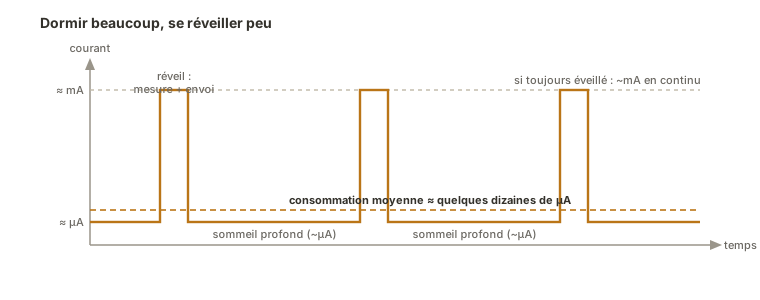
Putting an Arduino into deep sleep means sending the microcontroller to sleep so that its draw falls from several milliamps to a few microamps, while it waits for an event to wake it — an interrupt on a pin, or a watchdog timing out. It is the key to running on a battery: an object that sleeps 99% of the time and only wakes to act lasts months where, awake all along, it would last days.
What is it for?
An awake microcontroller draws current continuously, even when it is doing nothing useful. It runs its loop at full speed. On a USB-powered rig that hardly matters. On a battery-powered sensor (weather station, beacon, tracker), it is the battery life that collapses. Sleep turns the logic around: the system spends most of its time asleep, drawing almost nothing, and only wakes briefly to measure, transmit, then drop back off.
The principle boils down to a cycle: sleep → wake on an event → act fast → go back to sleep. The bigger the share of sleep, the longer the battery lasts. You put this in place late in the project, during the integration phase, as an energy optimisation of a rig that already works, never before the function itself does.
Step by step
Four steps: choose a sleep mode, shut down the peripherals, go to sleep, and prepare the wake-up.
1. Choose a sleep mode
An AVR offers several levels of sleep, from the lightest to the deepest. The further down you go, the less current you draw, but the fewer ways you have left to wake up:
- Idle — the processor stops, but the peripherals (timers, serial) keep running; waking is easy, the gain is modest.
- Power-down — almost everything shuts off, draw is minimal (a few µA), but only an external interrupt or the watchdog can wake the chip.
For battery life it is power-down you are after. The LowPower library (install it from the library manager) hides the register details and exposes these modes simply.
2. Shut down the peripherals you do not need
In deep sleep, peripherals that are still powered spoil the saving. In particular you turn off the analog-to-digital converter (ADC) and the brown-out detector (BOD). The LowPower library does it through arguments:
#include <LowPower.h>

// sleeps for 8 s, ADC off, brown-out detector off
LowPower.powerDown(SLEEP_8S, ADC_OFF, BOD_OFF);
3. Put the microcontroller to sleep
The call to powerDown() blocks on purpose: it is the one wait you allow yourself, since the goal is to do nothing. The program picks up right after that line when it wakes.
void loop() {
  faireLaMesure();                                   // brief, useful wake-up
  LowPower.powerDown(SLEEP_8S, ADC_OFF, BOD_OFF);    // then back to sleep for 8 s
}
Here the watchdog wakes the board every 8 seconds (the longest a WDT cycle can run). To sleep longer, you chain several cycles in a loop.
4. Prepare the wake-up
Two sources of wake-up out of deep sleep:
- the watchdog — a periodic wake-up (every N seconds), as above: ideal for a sensor taking a reading at a regular interval;
- an external interrupt — a wake-up on an event (a button, a motion detector): you attach the interrupt before going to sleep, and it is the interrupt that brings the board back to life.
// wake on an event: sleeps indefinitely until an interrupt on D2
attachInterrupt(digitalPinToInterrupt(2), reveil, FALLING);
LowPower.powerDown(SLEEP_FOREVER, ADC_OFF, BOD_OFF);
The gain is measured with a multimeter, in series with the rig’s supply. Three readings are enough to frame it:
| State of the rig | Measured current |
|---|---|
| Awake, taking a measurement | … |
Bare AVR in powerDown, ADC and BOD off | … (a few µA expected) |
| Complete Uno board, microcontroller asleep | … (several mA whatever you do) |
The gap between those last two lines is the whole point: sleep only delivers what it promises on a bare AVR or on a board designed for low power. The full battery-life calculation, from average current to how long a cell lasts, is worked through on the concept page.
Example — A battery sensor woken periodically
A battery-powered temperature sensor takes a reading every 32 seconds, sends it, then goes back to sleep. Since an AVR sleep cycle lasts 8 seconds at most, you chain four of them.
#include <LowPower.h>

const int CAPTEUR = A0;

void setup() {
  Serial.begin(9600);
}

void dormir(int secondes) {                  // chains 8 s cycles
  for (int i = 0; i < secondes / 8; i++) {
    LowPower.powerDown(SLEEP_8S, ADC_OFF, BOD_OFF);
  }
}

void loop() {
  int mesure = analogRead(CAPTEUR);          // useful wake-up: take the reading
  Serial.println(mesure);
  Serial.flush();                            // make sure everything is sent before sleeping

  dormir(32);                                // 4 × 8 s of deep sleep
}
Between two readings the board draws almost nothing. Serial.flush() matters: without it, you can fall asleep before the send has finished. Over time, the ratio of “32 s asleep for a fraction of a second awake” transforms battery life. That is the whole stake of a battery-powered object.
Pitfalls
The Uno board draws too much for sleep to be worth much. The voltage regulator and the USB chip on an Uno pull several milliamps all the time, whether the microcontroller is asleep or not. The real gain comes on a bare AVR or a board designed for low power (no USB, no thirsty regulator). On an Uno, the measurement is mostly there to teach.
Forgetting to shut down the ADC and the brown-out. Left running, they hold up a draw that ruins the saving. Always pass ADC_OFF and BOD_OFF (or turn them off yourself) in deep sleep.
Falling asleep before the send has finished. The serial port and the communication links are asynchronous: Serial.flush() (or its equivalent) guarantees the send is over before going to sleep, otherwise the message is cut short.
Believing the wake-up starts over. On waking from power-down, the program carries on after the sleep line. It does not restart as it would after a reset. Variables are kept. (Not to be confused with a watchdog reset, which does start again from setup().) On ESP32 it is the opposite: deep sleep restarts the chip on waking and runs setup() again (only the RTC memory survives), worth knowing if you port the code (the API and the wake sources are specific to the ESP32, see ESP32).
Wiring a wake source to a pin that cannot wake. In power-down, only certain interrupt pins can wake the chip (D2/D3 on an Uno). Check before you count on it.
A sleep duration that is not a multiple of 8 s. The dormir(secondes) helper loops secondes / 8 times: integer division truncates. dormir(32) does give 4 cycles (32 s), but dormir(30) gives 30 / 8 = 3 cycles, which is 24 s. The board sleeps less than asked, without the slightest warning. Pass a multiple of 8 s, or build the duration out of the finer constants (SLEEP_4S, SLEEP_2S, SLEEP_1S…).
Special case — Waking on a watchdog in interrupt mode
The watchdog has two opposite uses. In reset mode it restarts a board that has hung. In interrupt mode it fires a routine without restarting anything, and it is this second mode that acts as the periodic wake-up for sleep. The LowPower library uses it internally for its SLEEP_xS durations. Understanding that the same peripheral serves both as a safety net and as an alarm clock helps you keep the two roles apart.
Where it fits in the project
- Integration and testing phase — energy optimisation comes once the function is validated: you measure the draw, then bring in sleep to reach the battery life the specification asks for.
- Specification — the target battery life (“last a season on two AA cells”) is a requirement to state early. Sleep is the means of holding it, to be sized against the rig’s energy budget (see powering the board).
On a self-powered connected object, sleep is not an optimisation detail but the architecture of the program itself, which is why it is worth planning for the moment a battery constraint exists.
See also
- Deep sleep — the concept page: sleep modes and what they are worth in energy terms
- Arduino — hub for the Arduino tutorials
- Interrupts — the event-driven wake source
- Watchdog — the periodic wake source, and the safety net
- Powering an Arduino board — energy budget and choice of supply
- ESP32 — a family where deep sleep is especially well looked after (connected objects)