Bluetooth Low Energy (BLE) is the second radio built into the ESP32: a short-range, very frugal link designed to exchange small amounts of data between an object and a phone or another device. Where Wi-Fi aims at the network and the Internet, BLE aims at the direct and frugal link: a sensor publishing a measurement, a remote control, a configuration set from a mobile application. Like Wi-Fi, it is a capability the classic Arduino does not have. The concept in general is covered in wireless technologies and BLE. This page gives the ESP32 incarnation of it.
What is it for?
The BLE of the ESP32 earns its place when the link has to be local, frugal and free of infrastructure:
Publishing measurements to a phone — temperature, level, state — which a mobile application reads by connecting, with no Wi-Fi network and no server.
Receiving commands — an application sends a setpoint, the ESP32 applies it. A remote control, or a field configuration tool.
Saving energy — BLE draws far less than Wi-Fi, which suits battery-powered objects that have no need for the Internet.
Warning
BLE is not “classic” Bluetooth. BLE exchanges small pieces of data through characteristics. Classic Bluetooth (audio, SPP serial port) is another protocol. Only the original ESP32 has classic Bluetooth. Every other variant is BLE only. And the ESP32-S2 has no Bluetooth at all, to be checked board by board (see the overview in the ESP32 hub).
The GATT model: services and characteristics
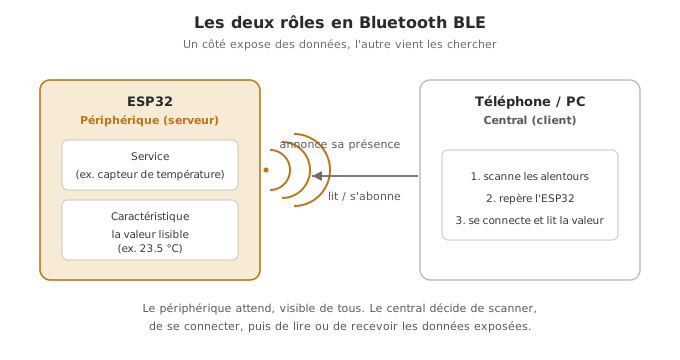
BLE organises data along the GATT model. Two roles and three objects to know:
Roles — the server (the ESP32, which holds the data and exposes it, also called the peripheral) and the client (the phone, which connects and reads or writes, also called the central).
Service — a logical grouping of data, identified by a UUID (unique identifier).
Characteristic — the data itself (a measurement, a state), inside a service. It carries properties: READ (the client can read), WRITE (the client can write), NOTIFY (the server pushes the value with no request).
Advertising — to be findable, the server broadcasts its presence. The client discovers it during a scan.
The idea: the ESP32 publishes a service holding a characteristic. A phone scans, connects, reads the characteristic (or receives its notifications).
Example — Publishing a counter by notification
A minimal GATT server: the ESP32 exposes a characteristic whose value increments every second and notifies it to the connected clients. Testable with the nRF Connect application (free, iOS/Android).
#include <BLEDevice.h>#include <BLEServer.h>#include <BLEUtils.h>#include <BLE2902.h> // descriptor required for notifications// UUIDs chosen freely (use an online generator for real projects)const char* UUID_SERVICE = "12345678-1234-1234-1234-1234567890ab";const char* UUID_CARACTERISTIQUE = "abcd1234-5678-90ab-cdef-1234567890ab";BLECharacteristic* caracteristique;unsigned long dernier = 0;int compteur = 0;void setup() { Serial.begin(115200); BLEDevice::init("ESP32-Capteur"); // name visible at scan time BLEServer* serveur = BLEDevice::createServer(); BLEService* service = serveur->createService(UUID_SERVICE); caracteristique = service->createCharacteristic( UUID_CARACTERISTIQUE, BLECharacteristic::PROPERTY_READ | BLECharacteristic::PROPERTY_NOTIFY); caracteristique->addDescriptor(new BLE2902()); // turns notifications on service->start(); BLEAdvertising* advertising = BLEDevice::getAdvertising(); advertising->addServiceUUID(UUID_SERVICE); advertising->start(); // becomes findable Serial.println("BLE up, waiting for a connection...");}void loop() { if (millis() - dernier >= 1000) { // every second dernier = millis(); compteur++; caracteristique->setValue(String(compteur).c_str()); // as text, readable on the phone caracteristique->notify(); // pushes to the clients Serial.print("Notified: "); Serial.println(compteur); }}
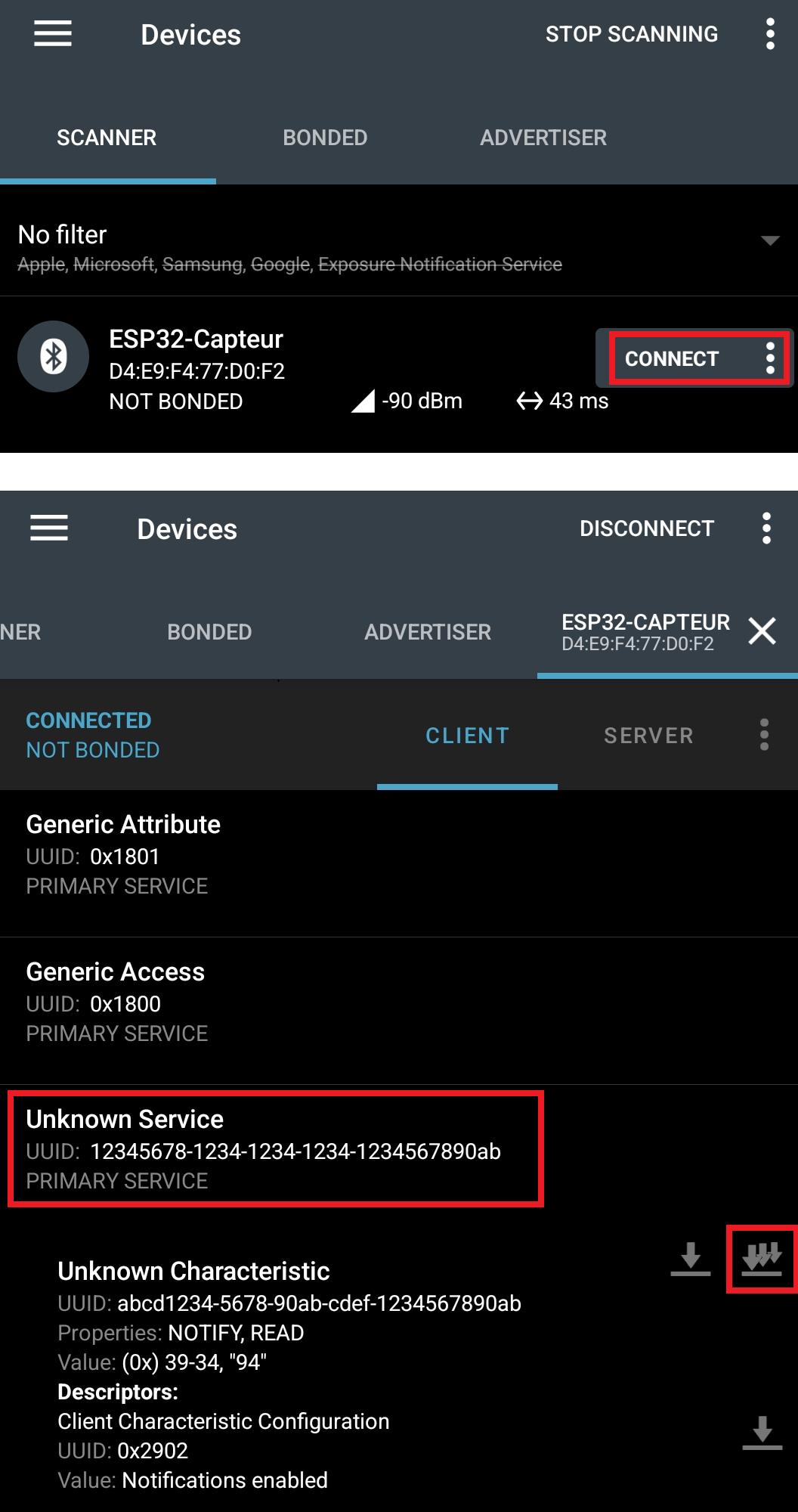
Upload, open nRF Connect on the phone, scan: ESP32-Capteur shows up. Connect, unfold the service, turn on notifications for the characteristic: the value increments live. The board pushes the data without the phone having to ask again.
Tip
Text or binary? The value goes out as text here, so that it shows up as it is in nRF Connect. A BLE characteristic really carries raw bytes: setValue(compteur) with an integer would send four bytes, which the application would show in hexadecimal (01-00-00-00). Real projects prefer that binary format, more compact. Text is a comfort for bring-up.
Pitfalls
Mixing up BLE and classic Bluetooth. Trying to hook an audio headset or an SPP serial port onto BLE does not work: they are two protocols. For a “wireless serial port”, it is classic Bluetooth, on the original ESP32 only.
A variant with no Bluetooth. On an ESP32-S2, this code neither compiles nor runs: no Bluetooth radio at all. Check the variant before aiming at BLE.
Notifications with no descriptor. A NOTIFY characteristic without the BLE2902 descriptor: the client cannot subscribe and receives nothing. Add it as a matter of course for notifications.
Mismatched UUIDs. The client looks for a precise UUID. One wrong character on the server side and it does not find the characteristic. Copy and paste the UUIDs, do not retype them.
A bulky BLE library. The built-in BLE stack takes a lot of Flash. A BLE plus Wi-Fi sketch can overflow the default partition. Pick a suitable partition scheme (Outils → Partition Scheme) or the lighter NimBLE stack (see Going further).
No test tool. With no BLE application on the phone, there is no way to check the server. Install nRF Connect (or an equivalent) before you start.
Exercises
Wiring: sensor on GPIO34 and LED on GPIO16 (see the circuits of configuring the GPIO).
Exercise 1 — Notifying a real measurement
Replace the counter by the reading of an analog sensor on GPIO34 (ADC1), notified every 500 ms. What changes?
Answer to exercise 1
Only the source of the value changes. The whole BLE structure stays identical.
// ... (same includes, UUIDs, BLE setup unchanged) ...const int CAPTEUR = 34; // ADC1void loop() { if (millis() - dernier >= 500) { dernier = millis(); int valeur = analogRead(CAPTEUR); // 0..4095 caracteristique->setValue(valeur); caracteristique->notify(); Serial.println(valeur); }}
The server/service/characteristic structure is exactly the same. That is the point of the GATT model: one skeleton for any data at all.
Exercise 2 — Receiving a command (a write characteristic)
Add a write characteristic: when the client writes 1 into it, the board lights a LED (GPIO16). With 0, it switches it off. Hint: a write callback.
Answer to exercise 2
You declare the characteristic with PROPERTY_WRITE and attach a callback that reacts to every write.
const int LED = 16;const char* UUID_CMD = "0000aaaa-0000-1000-8000-00805f9b34fb";class CmdCallback : public BLECharacteristicCallbacks { void onWrite(BLECharacteristic* c) override { String v = c->getValue().c_str(); if (v == "1") digitalWrite(LED, HIGH); else if (v == "0") digitalWrite(LED, LOW); }};// in setup(), after createService(...):// pinMode(LED, OUTPUT);// BLECharacteristic* cmd = service->createCharacteristic(// UUID_CMD, BLECharacteristic::PROPERTY_WRITE);// cmd->setCallbacks(new CmdCallback());
The onWrite callback is called by the BLE stack on every write from the client. From nRF Connect, writing the value 1 or 0 into the characteristic drives the LED: a remote control with no dedicated application.
Special case — The board as a client (scanning)
The ESP32 can also be the central: scanning the BLE peripherals around it. Useful to detect beacons or other sensors.
#include <BLEDevice.h>#include <BLEScan.h>void setup() { Serial.begin(115200); BLEDevice::init(""); BLEScan* scan = BLEDevice::getScan(); BLEScanResults* res = scan->start(5); // 5-second scan (core 3.x: a pointer) Serial.print(res->getCount()); Serial.println(" BLE peripherals found.");}void loop() {}
A board cannot be an elaborate server and an intensive scanner at the same time without precautions. For mixed roles, plan the architecture (see Multitasking with FreeRTOS).
Where it fits in the project
Step 4 of the proof-of-concept phase — if the project exposes data to a phone with no network (a wearable sensor, a remote control), validating early a GATT server readable by nRF Connect lifts the connectivity uncertainty. Often enough where Wi-Fi would be oversized.
A mobile configuration interface — a write characteristic lets you set parameters from a phone, with no physical HMI.
Choosing between Wi-Fi and BLE from the PoC onwards, on the real need (Internet versus local link, energy available), avoids oversizing the radio: BLE is more frugal when the Internet is not required.