The Raspberry Pi is a single-board computer (SBC): a credit-card-sized board that runs a full operating system (Linux), where a microcontroller runs a “bare” program straight on the processor. So it is not a microcontroller: it is a real miniature computer, with its USB ports, its video output, its network and its storage. It sits here among the control targets all the same, because it does the same job on a project when the need outgrows the microcontroller. This page is the entry hub of the module: it frames the MCU versus SBC choice, then points to the tutorials.
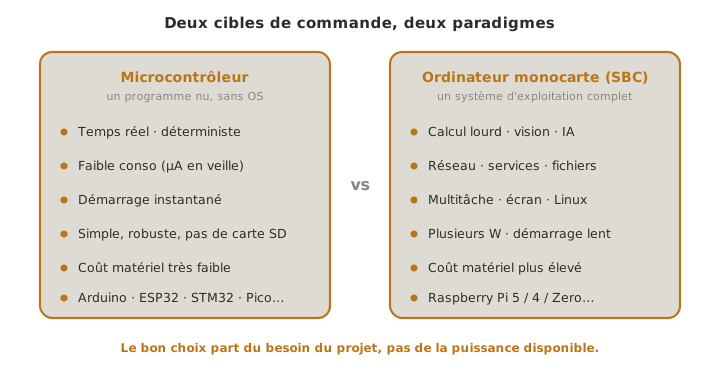
Microcontroller or SBC?
That is the real question, and it is settled during concept, just like the other architecture choices, typically in a decision matrix per subsystem. The useful reflex: start from the need, not from the power on offer.
A microcontroller wins when the project calls for:
- real time and determinism — a control loop, a motor command, a reading clocked to the microsecond;
- low power — a battery system that has to last for days (sleep modes in µA);
- instant start-up — the program runs a few milliseconds after power is applied;
- simplicity and robustness — no OS to corrupt, no SD card to mount, and very low hardware cost.
An SBC like the Raspberry Pi takes over when the project calls for:
- heavy computing — computer vision, image processing, machine-learning models, intensive floating-point work;
- networking and services — web server, database, Internet communication, APIs;
- multitasking — running several programs in parallel, arbitrated by the OS;
- a screen, files, a complete software ecosystem — all the richness of a Linux environment (Python, OpenCV, any library you like).
The price of those capabilities: several watts of consumption (unthinkable on a battery meant to last), a slow start-up (the OS takes tens of seconds to come up), an SD card that is easy to corrupt if power is cut abruptly, and no real-time guarantee. The OS scheduler can suspend the program at any moment (see driving the GPIO from Linux).
Tip
Very often the right answer is not “one or the other” but both: an SBC for the high level (vision, planning, networking) and a microcontroller for the real time (motors), linked by a bus. That is the two-headed architecture detailed in the SBC in a project.
The Pico, for its part, is a microcontroller
Beware of the name. The Raspberry Pi Pico (RP2040 / RP2350 chips) carries the same brand, but it is a genuine microcontroller, not an SBC: no OS, a bare program, low power. Nothing this page says about the Linux SBC applies to it. The Pico is covered in the MicroPython module (and stays programmable in C/C++). Put plainly: Raspberry Pi 5 / 4 / Zero → this page; Raspberry Pi Pico → MicroPython.
Board overview
Info
This table is a teaching landmark, to be confirmed on
raspberrypi.combefore a choice is frozen (ranges and availability keep changing).
| Board | Chip (SoC) | Core | RAM | What for |
|---|---|---|---|---|
| Raspberry Pi 5 | BCM2712 | 4× Cortex-A76 ~2.4 GHz | 1–16 GB | the most powerful; vision, computing, PCIe, two camera ports |
| Raspberry Pi 4 B | BCM2711 | 4× Cortex-A72 ~1.8 GHz | 1–8 GB | the workhorse, very widespread and well documented |
| Raspberry Pi Zero 2 W | RP3A0 | 4× Cortex-A53 ~1 GHz | 512 MB | tiny, built-in Wi-Fi and BT, moderate power draw — constrained embedded work |
| Compute Module 4 / 5 | (same as Pi 4 / 5) | — | — | the “to be integrated” version, on a carrier board — industrial projects |
All of them expose a row of 3.3 V GPIO pins (usually 40 of them) and are programmed the same way once the OS is installed. The choice comes down to power (Pi 5 for vision, Zero 2 W for compact embedded work) and size.
Warning
The Raspberry Pi GPIO runs at 3.3 V and is not 5 V tolerant. Applying 5 V to an input pin — a sensor powered from 5 V, a signal coming from an Arduino — can destroy the pin, or even the SoC. For a 5 V signal, a level shifter is needed (see logic levels).
Tutorials
The module follows a path of its own, specific to the SBC, different from the microcontroller families, because what is learned here is how to use a computer, not how to program a bare chip. The entries marked (cross-cutting) are shared pages, valid well beyond the Raspberry Pi.
Getting started
- Getting started with the Raspberry Pi — install Raspberry Pi OS, boot without a screen (headless) and connect over SSH;
- Operating system (cross-cutting) — what a full OS brings, and what it costs.
Driving the hardware
- Driving the GPIO from Linux —
gpiozero/RPi.GPIO/lgpio, reading a sensor, driving an actuator, and why real time is not guaranteed; - Logic levels (cross-cutting) — 3.3 V, the Pi GPIO is not 5 V tolerant;
- GPIO (cross-cutting) — the idea of a logic input and output, whatever the board.
Putting it to work on a project
- The SBC on a mechatronics project — the high-level brain plus real-time microcontroller architecture, and the cases where the SBC is enough on its own;
- Communication buses (cross-cutting) — UART / I2C / SPI to link the SBC to a microcontroller.
How embedded code is structured is still covered in firmware, on the understanding that, under an OS, there are means available (processes, threads, tasks) that a bare microcontroller does not have.
See also
- Microcontroller — parent hub: overview of the families and selection guide
- MicroPython — for the Raspberry Pi Pico (a microcontroller), not to be confused with the SBC
- Operating system — the software layer that separates an SBC from a microcontroller
- Decision matrix — the tool for choosing the target, during concept