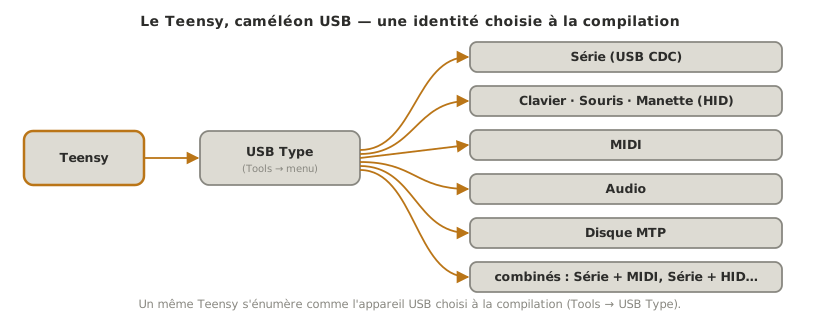
A Teensy can enumerate as almost any USB device: serial port, keyboard, mouse, joystick, MIDI instrument, sound card and more. The type is chosen at compile time, in the Tools → USB Type menu, and the Teensy appears to the computer as the selected device. This is a capability of the USB hardware and of the PJRC software stack (not just a library), and one of the Teensy’s signature features: it becomes a human-machine interface or a music controller in a few lines. Structuring the program as a whole is covered in firmware.
What is it for?
Turning a circuit into a driverless USB peripheral opens up direct project uses:
Human-machine interface. A keyboard Teensy types text or shortcuts, a mouse Teensy moves the cursor, and a joystick Teensy drives a game or a simulation.
Music controller. A MIDI Teensy sends notes and control messages to audio software, the basis of a controller or an instrument.
Sound card. An audio Teensy exchanges sound with the computer (see audio on the Teensy).
All of it without drivers on common systems: the computer recognises a standard USB peripheral.
The USB Type menu
Everything starts at Tools → USB Type. The choice is made before compiling and determines how the Teensy presents itself:
Serial (default) — a serial port (USB CDC), for the serial monitor;
Keyboard / Mouse / Joystick — a human interface device (HID);
MIDI (or MIDIx16) — a MIDI instrument;
Audio — a sound card;
MTP Disk, Raw HID, Flight Sim Controls and more — other specialised profiles;
combinations: Serial + MIDI, Serial + Keyboard + Mouse + Joystick and so on — which stack several identities, including Serial so debugging stays available.
Depending on the type chosen, global objects become available in the sketch: Keyboard, Mouse, Joystick, usbMIDI and others. They are used like any other Arduino API.
Example — A button that types on the keyboard
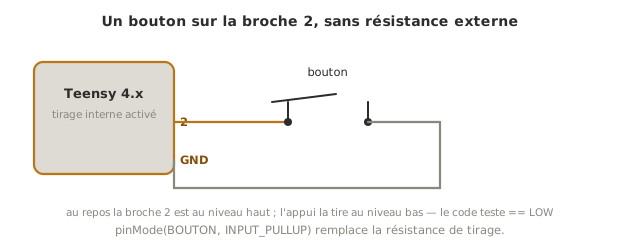
This circuit sends text to the computer when a button is pressed. It assumes USB Type set to Keyboard (or a combination including the keyboard, for instance Serial + Keyboard + Mouse + Joystick to keep the serial monitor).
const int BOUTON = 2;bool dejaAppuye = false;void setup() { pinMode(BOUTON, INPUT_PULLUP); // appui = niveau bas}void loop() { bool appuye = (digitalRead(BOUTON) == LOW); if (appuye && !dejaAppuye) { // détection de front : agir une seule fois par appui Keyboard.print("Teensy!"); // tape le texte sur l'ordinateur } dejaAppuye = appuye; delay(10); // anti-rebond simple}
Edge detection (appuye && !dejaAppuye) guarantees that the text is typed once per press rather than repeatedly, which is essential for a peripheral that acts on the computer. For a MIDI controller, the principle is the same with usbMIDI: usbMIDI.sendControlChange(7, valeur, 1), for instance, sends a MIDI volume value read from a potentiometer.
Pitfalls
Forgetting to set the USB Type. If the code uses Keyboard or usbMIDI while USB Type is still on Serial, compilation fails (unknown object) or the peripheral does not show up. Set the type before compiling.
Losing the serial monitor. Choosing a type without Serial (for example Keyboard alone) removes the debugging serial port. To keep both, choose a combinationSerial + ….
An HID that runs away at start-up. A keyboard or mouse Teensy that sends events in a loop as soon as it is plugged in disrupts the computer (uncontrolled typing or cursor). Always make the action conditional on an event (button, sensor) through edge detection.
Being unable to reprogram a runaway HID. If a Teensy turned keyboard or mouse runs away, the IDE may struggle to reprogram it: press the button on the board to force programming mode (see getting started).
Forgetting usbMIDI.read() on the receiving side. To receive MIDI, and not only send it, usbMIDI.read() must be called regularly in loop().
Exercises
Exercise 1 — A keyboard shortcut
Modify the example so that a press sends the Ctrl + C shortcut (copy) instead of text. Hint: keys have to be pressed and then released.
Solution
Use Keyboard.press() / Keyboard.release() (or Keyboard.releaseAll()) instead of print():
print() is right for typing text. A shortcut requires holding a combination, hence press + release. Edge detection is still essential, so the shortcut is not spammed.
Exercise 2 — A MIDI potentiometer
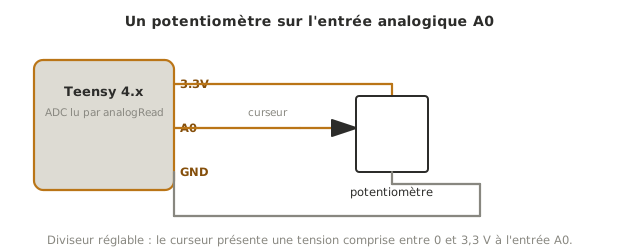
Turn a potentiometer (on an analog input) into a MIDI controller: send a Control Change only when the value changes, so the link is not flooded. Which USB Type is needed?
Solution
USB Type on MIDI (or Serial + MIDI to keep debugging). Read the potentiometer, scale the value to 0–127, and send only on change:
int dernier = -1;void loop() { int v = analogRead(A0) >> 3; // 0..1023 -> 0..127 (12 bits : ajuster) if (v != dernier) { usbMIDI.sendControlChange(7, v, 1); // CC 7 = volume, canal 1 dernier = v; } usbMIDI.read(); // bonne pratique : vider la file MIDI entrante}
Sending only on change avoids saturating the MIDI link with identical messages. (The >> 3 shift assumes a 10-bit reading. With analogReadResolution(12), adjust the scaling.)
Special case — Combined types and Raw HID
Combined types.Serial + MIDI, Serial + Keyboard + Mouse + Joystick stack several identities. The useful habit during development is to keep Serial, so a peripheral that would otherwise expose no serial port can still be debugged.
Raw HID — for a custom protocol between the Teensy and in-house software, without going through the standard profiles. More advanced, but very flexible.
Where it fits in the project
Step 4 of the proof of concept phase. For an interface project (control panel, controller, custom peripheral), checking early that the Teensy is recognised as the right USB device and reacts to a physical event determines all of the downstream ergonomics.
Safe use. An HID device acts on the computer. Making its actions conditional every time (edge detection, an arming button) prevents stray behaviour, and belongs in the technical file.
Understanding that USB identity is a compile-time choice, and that HID actions must be triggered rather than merely allowed to happen, gives the grammar of the Teensy as an interface: a physical circuit that becomes, at will, a keyboard, a joystick or an instrument.